Trend Explorer
Recent download momentum
Hourly download deltas for the last 48 hours.
About this addon
What it does
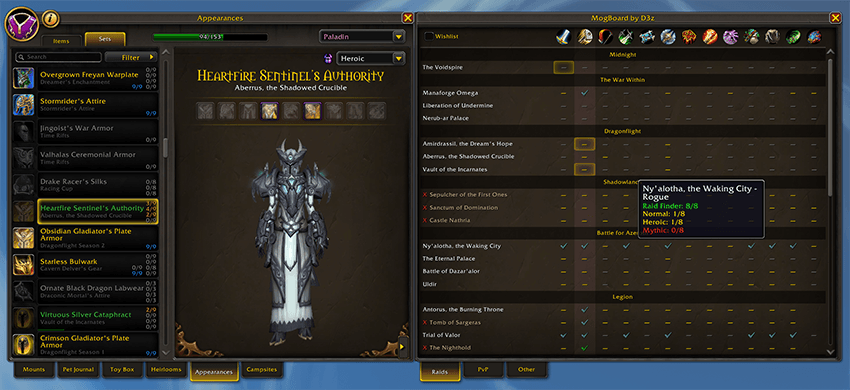
MogBoard is a lightweight addon that embeds a side panel directly into the native Wardrobe Sets tab. No separate window, no extra UI, it integrates seamlessly into the Collections interface you already use.
Type /mb to instantly open the Appearances journal with MogBoard visible, ready to go.
Features
Collection Grid
Browse all transmog sets in a compact grid organized by class. Each cell shows your collection status at a glance: gray dash (nothing collected), yellow dash (in progress), blue checkmark (at least one variant complete), or green checkmark (all variants complete). Left-click any cell to jump directly to that set in the Wardrobe, cycling through difficulty variants on repeated clicks.
Raids / PvP / Other Tabs
Sets are automatically categorized into three tabs based on their source, so you can focus on what matters to you.
Wishlist
Right-click any cell to mark a set as wishlisted. Wishlisted cells glow gold. Toggle the wishlist filter to display only your tracked sets, perfect for planning your next farming session.
Raid Lockout Tracking
See which raids you're saved to directly in the panel. Hover over a raid name to view lockout details across your entire warband, including difficulty, boss progress, and remaining encounters.
Customizable
Hide classes you don't care about with Shift+Right-click on their column header.
Localized
Fully translated in all Wow suipported langages.
Usage
/mb : Opens the Appearances journal directly to the Sets tab with MogBoard visible.
At-a-glance numbers
Performance highlights
- Peaked at Hot #2579 on Jun 1, 2026.
- Peaked at Rising #4312 on May 25, 2026.
- Featured on the Hot list across 5 distinct weeks.
- Shipped 1 release in the last 30 days.
- Averaging 1 new downloads per day over the past week.
Visuals
Screenshots 4
Use real gameplay shots to assess the addon before installing.