Trend Explorer
Recent download momentum
Hourly download deltas for the last 48 hours.
Latest hour +0 Jul 26, 4 PM
Peak hour +0 Jul 28, 3 PM
Average +0 per hour
About this addon
What it does
Mailbox Alt Dropdown
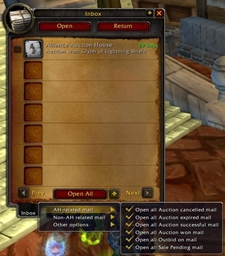
Adds a dropdown menu to the mailbox for selecting alts. When you open the mailbox, you will see a dropdown menu listing all your alts on the realm, with their names colored according to their class. Clicking on an alt's name will paste it into the "To:" field of the mail.
Features
- Automatically detects your alts and their classes when you log in.
- Dropdown menu with class-colored names.
- Easy selection of alts for mailing.
- Type /mad to open config menu.
- - Inside config menu, click on any character to add a note for that character.
- - Inside config menu, click Blacklist to hide this character from mail dropdown.
- - Inside config menu, uncheck action tooltip to hide default tooltip.
Installation
- Download the latest version of the addon.
- Extract the zip file into your
World of Warcraft/_retail_/Interface/AddOnsdirectory. - Restart World of Warcraft or reload the UI (
/reload).
Usage
- Open the mailbox.
- Click on the dropdown menu next to the "To:" field.
- Select an alt to paste their name into the "To:" field.
License
This addon is licensed under the MIT License. See the LICENSE file for details.
At-a-glance numbers
Performance highlights
- Peaked at Hot #2863 on Jul 14, 2026.
- Peaked at Rising #4893 on Jul 24, 2026.
- Featured on the Hot list across 6 distinct weeks.
- Shipped 1 release in the last 30 days.
- Averaging 1 new downloads per day over the past week.
Visuals
Screenshots 3
Use real gameplay shots to assess the addon before installing.