Trend Explorer
Recent download momentum
Hourly download deltas for the last 48 hours.
Latest hour +0 Jul 26, 1 PM
Peak hour +0 Jul 28, 12 PM
Average +0 per hour
About this addon
What it does
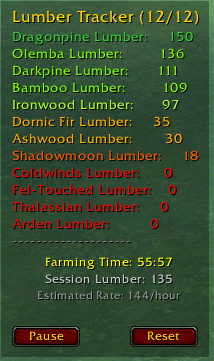
Lumber Tracker is a lightweight addon that displays selected lumber materials from your bags and Warband bank, using dynamic color-coding for quick visual reference.
You can configure exactly which materials to track through a simple in-game menu (right-click the minimap button or the main window).
The display updates automatically whenever your inventory changes. ✨
Features
- 🌲 Tracks 12 lumber types from multiple expansions
- ✔️ Enable or disable materials individually
- 🎨 Color-coded quantities (red → orange → yellow → green → cyan)
- 📦 Movable tracker window with saved position
- 🔘 Circular draggable minimap button
- 🛠️ Clean configuration panel built with Blizzard UI templates
- 💾 Full SavedVariables support
- ⌨️ Slash commands:
/ltor/lumber(toggle, config, resetminimap) - Timer for Farming Sessions
How to Use
- Left-click minimap button: Show/hide the tracker window
- Right-click minimap button or window: Open configuration menu
- Drag main window: Move the tracker anywhere on the screen
- Drag minimap button: Reposition around the minimap
- ESC: Close configuration panel
- Commands:
/lt→ Toggle tracker/lt config→ Open settings/lt resetminimap→ Reset minimap button position
At-a-glance numbers
Performance highlights
- Peaked at Hot #3654 on Jul 21, 2026.
- Peaked at Rising #5547 on Jul 21, 2026.
- Featured on the Hot list across 6 distinct weeks.
- Shipped 1 release in the last 30 days.
- Averaging 0 new downloads per day over the past week.
Visuals
Screenshots 3
Use real gameplay shots to assess the addon before installing.