Trend Explorer
Recent download momentum
Hourly download deltas for the last 48 hours.
About this addon
What it does
The lucid nightmare maze may seem completely random, but if you retrace your steps you will find yourself in the same room. For this reason, a simple map that traces your movements (north - south - east - west) can help you go back to those certain rooms that have an object of interest.
type /lnm to open the frame (it's only useful in the Endless Halls)
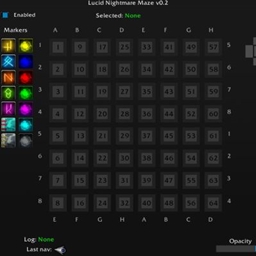
The frame generates "rooms" as you move through the halls.
There are five "Set" buttons that let you change the current room color, which can be used to mark a room on the map where an orb/rune is found, making it easy to retrace your steps when you need to return to that specific room.
At any moment, if you feel the map has become unreadable because of the illogical pattern of the maze, you can use the Reset Map button and restart mapping from any point
This addon isn't the solution to the maze, but a helping hand to avoid having to manually map with pen and paper.
Any feedback is welcome
This addon is based on a dead (for a while) project Lucid Nightmare Helper.
A bit of theory
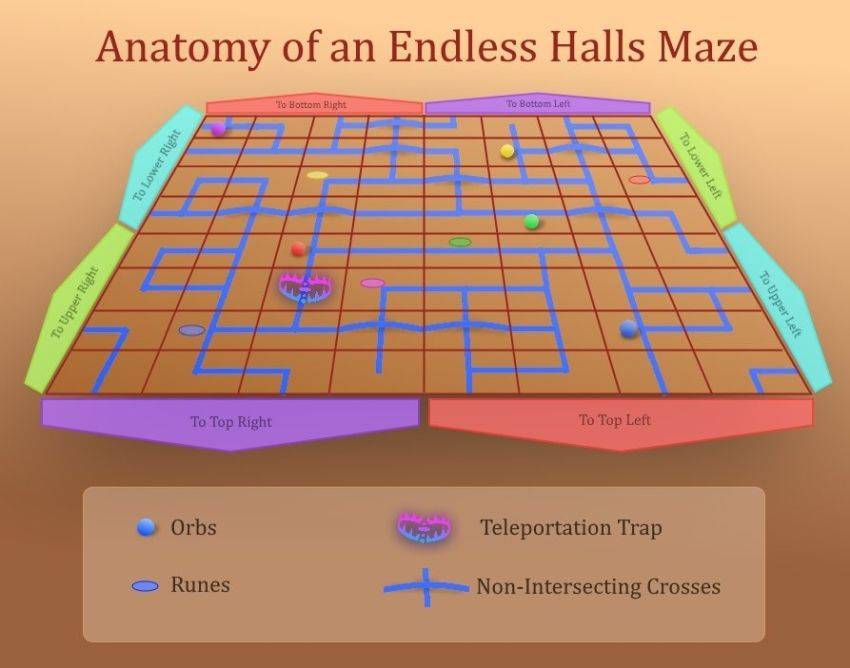
Technically, the maze is an 8x8 matrix with a trap-room that can teleport you to any room. The edges of the matrix are circled to the opposite edge with an offset of 4 cells. The maze has rooms with 1, 2 and 3 exits. If the room has 2 exits in a straight line (on the sides of the rubble), then it almost always has an intersection with the second passage at this point.
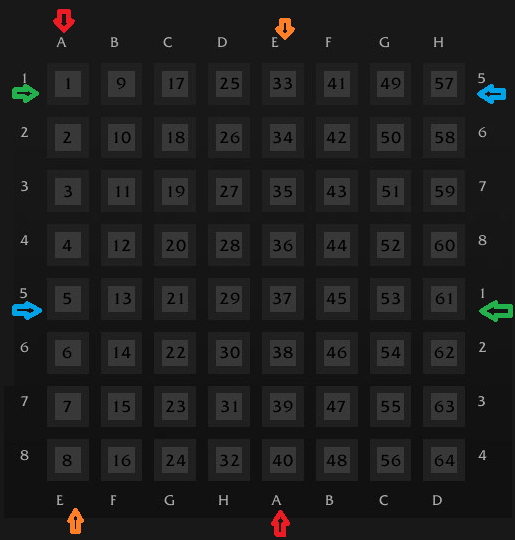
The most incomprehensible is the official explanation regarding rooms with 4 exits. By Non-Intersecting Cross rooms (they are rooms with 4 exits) we mean 2 rooms with 2 direct passages, geographically occupying one and the same coordinate in the plane. There is map of my Labirynth...
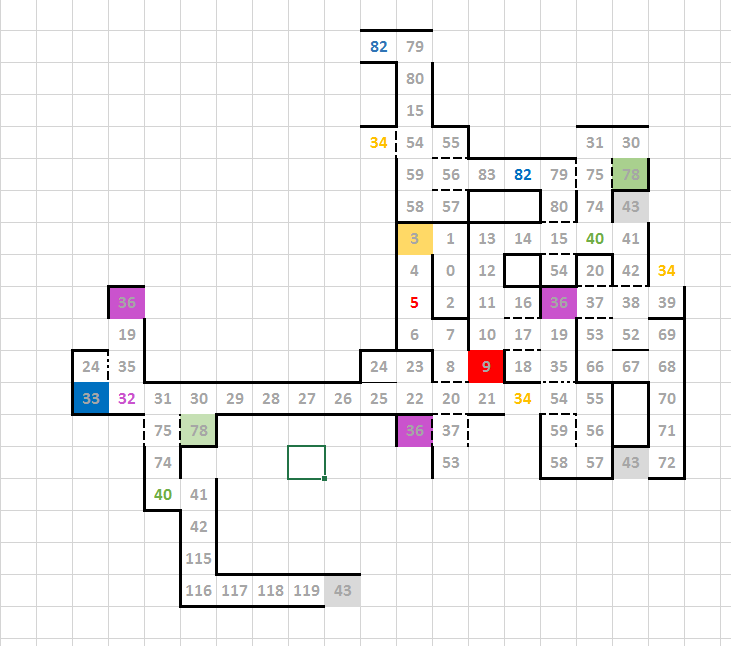
In my labyrinth, for example, passage 37 (intersection from 20 to 53 and from 36 to 38) or 20 (intersection from 8 to 37 and from 22 to 21). Technically, they can be presented one above the other, visually there will be debris in these rooms on the left and right. 48 is a trap room here.
Draw a map if you do not want to rely on chance (it is different for everyone: from 30 minutes of success to 6 hours without success)
Do not extinguish the runes until you have marked all 5 runes and 5 spheres on the map. This is important - they are your only markers in this maze.
How to calculate the trap-portal: run in the maze with the camera as far away as possible. When moving, do not press forward until the room appears. If you appeared in the room and the camera rested on the floor, i.e. behind the wall - you found a trap. This is the only way, but you can also be ported into a room with a passage at backside - you won't guess here.
There can be no other intersections except for non-intersecting rooms. There are no spheres or runes in the non-intersecting rooms.
If you use this addon, go through the maze thoughtfully, mark all rubble, runes, orbs. Do not use the "jump the room" function (as possible), it is not well designed here and will break the geometry of the maze.
At-a-glance numbers
Performance highlights
- Peaked at Hot #3353 on Jul 26, 2026.
- Peaked at Rising #5614 on Jul 26, 2026.
- Featured on the Hot list across 6 distinct weeks.
- Shipped 1 release in the last 30 days.
- Averaging 4 new downloads per day over the past week.
Visuals
Screenshots 2
Use real gameplay shots to assess the addon before installing.