
Trend Explorer
Recent download momentum
Hourly download deltas for the last 48 hours.
About this addon
What it does
Tired of endless debates about which Mythic+ dungeon to run? Let fate decide with Keystone Roulette!
Description
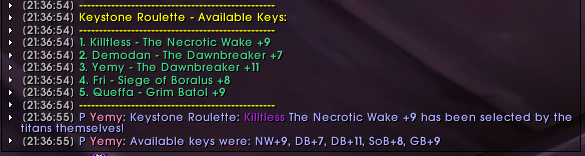
Keystone Roulette adds a bit of excitement to your Mythic+ runs by randomly selecting a keystone from your party members.
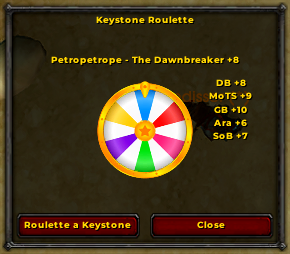
Type /ksr to open the GUI to roulette for a keystone to run or simply type /ksr roll or /ksr roulette to roll without GUI, and the addon will:
- Gather keystone information from everyone in your group.
- Choose a keystone at random.
- Announce the chosen dungeon in party chat, along with a fun, randomized message.
- List all available keystones for transparency.
No more arguments, no more indecision – just pure, unadulterated dungeon-running fun!
Download
You can download Keystone Roulette from these popular sources:
Slash Commands
Keystone Roulette offers the following slash commands:
/ksr: Opens the roulette GUI to visually roll for a keystone./ksr roll,/ksr roulette: Rolls for a random keystone from your party./ksr options: Opens the addon's options panel./ksr help: Displays a help message with usage instructions./ksr debug: Toggles debug mode./ksr reset: Resets the addon settings to their defaults and reloads the UI.
Troubleshooting
If you encounter any issues, try these steps:
- Type
/ksr reset: This will reset the addon settings to defaults, which might resolve some problems. - Check for error messages: Pay attention to any error messages in the chat frame, as they might provide clues about the issue.
Debugging and Reporting Issues
To help diagnose problems, Keystone Roulette has a debug mode that provides more detailed information. Here's how to enable it and report issues:
Enable debug mode: Type
/ksr debugin the chat frame. This will enable debug messages, which might reveal the cause of the issue. Note: While debug mode is enabled, messages will be printed to the console/chat window instead of the party chat.Reproduce the error: Try to reproduce the error you're experiencing while debug mode is enabled.
Gather debug output: Look for debug messages in your chat window. These messages might contain clues about the problem.
Report the issue: If you're still unable to resolve the issue, please open an issue on the GitHub repository and include the following information:
- A description of the issue.
- Steps to reproduce the error.
- Any relevant debug output.
By providing this information, you'll help me identify and fix bugs more efficiently, making Keystone Roulette even better!
At-a-glance numbers
Performance highlights
- Peaked at Hot #1162 on Jul 23, 2026.
- Peaked at Rising #495 on Jul 23, 2026.
- Featured on the Hot list across 6 distinct weeks.
- Shipped 2 releases in the last 30 days.
- Averaging 21 new downloads per day over the past week.