Trend Explorer
Recent download momentum
Hourly download deltas for the last 48 hours.
About this addon
What it does
Enhanced Version of the Original by "wealdly" - an addon which bridges WoW's Assisted Combat API with your action bars, displaying recommended spells alongside their actual keybinds/hotkeys in a customizable queue.
I did some enhancements with the help of AI (ChatGPT, Gemini and DeepSeek) because I am a complete noob and just wanted some changes for myself. I would love to hear your feedback on what doesn't work, what works well, or which changes you would like to see.
What's New:
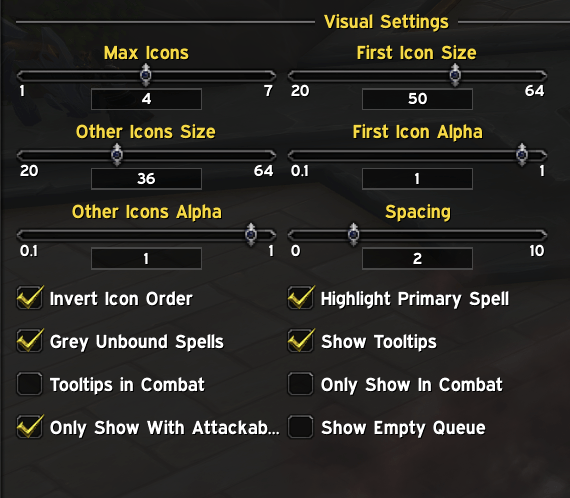
- Inverted Mode (Icons are mirrored)
- Some Alpha Settings (Icon transparency)
- More Highlight Options on the Main Icon
- Slider for Moving the Main Icon a bit away from the other ones
- Hide the Keybinds completely
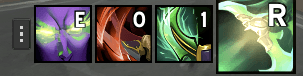
JustAC-Enhanced is a World of Warcraft addon that displays a queue of assisted combat abilities with their hotkeys.
What It Does
- Shows a visual queue of spells recommended by WoW's built-in Assisted Combat system
- Displays keybinds for each spell directly on the icons
- Automatically scans your action bars to find where spells are bound
- Provides customizable highlighting for your primary spell
Key Features
- Smart Hotkey Detection: Automatically finds which keys your spells are bound to
- Customizable Display: Adjust icon sizes, spacing, transparency, and highlight effects
- Blacklist System: Hide specific spells from appearing in the queue
- Manual Hotkey Overrides: Set custom hotkey text when automatic detection fails
- Combat Awareness: Options to only show during combat or when you have a target
- Drag & Drop Interface: Easily reposition the spell queue
Quick Commands
/jacor/justac- Open configuration/jac toggle- Pause/resume the display/jac debug- Toggle debug mode
Setup
- Make sure Assisted Combat is enabled in WoW's settings:
/console assistedMode 1/console assistedCombatHighlight 1/reload
The addon works by scanning your action bars and displaying the spells that WoW's Assisted Combat system recommends, complete with the actual keybinds you've assigned to them.
At-a-glance numbers
Performance highlights
- Peaked at Hot #3545 on Jul 3, 2026.
- Peaked at Rising #5132 on Jul 7, 2026.
- Featured on the Hot list across 6 distinct weeks.
- Shipped 1 release in the last 30 days.
- Averaging 2 new downloads per day over the past week.