Trend Explorer
Recent download momentum
Hourly download deltas for the last 48 hours.
Latest hour +0 Jul 26, 8 PM
Peak hour +1 Jul 28, 12 AM
Average +0 per hour
About this addon
What it does
Versions prior to 1.5.0 had a critical issue. Please accept version 1.5.0 or later.
JSpecBar
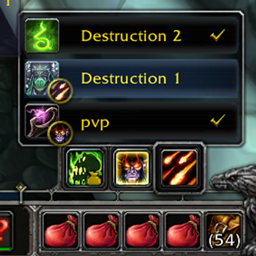
- Simple SpecBar like default addon. Easy change of Spec and Loot Spec
- It works in conjunction with basic add-ons and options.
Important
- I aim for add-ons that do not have options and commands if possible.
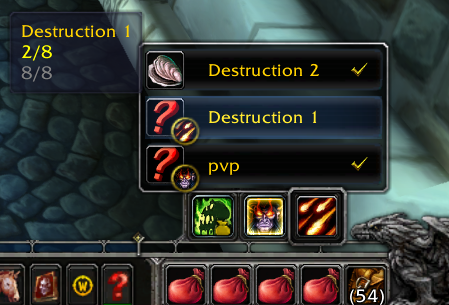
function
1. SpecChange
- LeftClick - Change Spec
- RightClick - Change Loot Spec
2. Change Assign Equip Set
- when you place the cursor on the SpecButton, the EquipSet window pops up.
- LeftClick - change Spec with change Assign EquipSet
- RightClick - just use EquipSet
- Shift+Click - Unassign EquipSet
- Tooltip1 (Item to swap/Number of items in EquipSet)
- Tooltip2 (missing Items/Number of items in EquipSet)
- Only the EquipSet corresponding to the SpecName(ex:Holy, Destruction) of the SpecButton and the EquipSet not included in any SpecName are displayed in the list.
3. Moving SpecBar
- You can drag a Shift+LeftMouseButton to a SpecButton.
- If you do not like the location, you can initialize the location by double-clicking the Shift+LeftMouseClick.
- Location storage uses the wow official function. It is therefore managed on the server.
- path(...\World of Warcraft\WTF\Account\accountName\Servere\CharacterName\layout-local.txt)
4. Multilingual
- Language is not required when using
ps. I am Korean and I am not familiar with English. Please understand.
There are currently three addons I am updating:
--JMainMenuBar (Classic style bottom main menu bar artwork)
--JTooltip (Just place the tooltip next to the cursor without any modifications.)
At-a-glance numbers
Performance highlights
- Peaked at Hot #3781 on Jul 16, 2026.
- Peaked at Rising #4033 on Jun 29, 2026.
- Featured on the Hot list across 6 distinct weeks.
- Shipped 1 release in the last 30 days.
- Averaging 0 new downloads per day over the past week.
Visuals
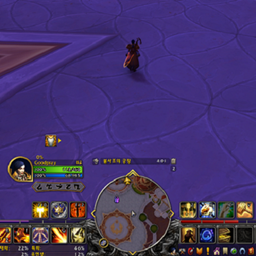
Screenshots 1
Use real gameplay shots to assess the addon before installing.