Trend Explorer
Recent download momentum
Hourly download deltas for the last 48 hours.
Latest hour +4 Jul 26, 3 AM
Peak hour +13 Jul 26, 9 PM
Average +3 per hour
About this addon
What it does
Immersion ExtraFade works as a plugin to MunkDev's outstanding addon Immersion, providing the following options:
- Keep the chat box and/or tracking bar: When Immersion fades out the UI during NPC interaction, you never see which rewards you are getting or by how much your XP bar is increasing. Immersion ExtraFade allows to keep the chat box and/or tracking bar visible during NPC interaction. The tracking bar's opacity can even be reduced to match the transparent look of the chat box. See Video 1 below.
- Keep alert frames (e.g. Covenant Renown or when completing achievements) during Immersion's NPC interaction.
- Hide the frame rate label (the one activated pressing ctrl-r) during Immersion's NPC interaction.
- Hide NPC Portrait in Immersion Frame: Only show text in Immersion frame, which can help to focus on the NPCs in the game world while interacting with them.
- Furthermore, the tooltips of UI elements are not hidden by Immersion, even if you select Immersion's "Hide Tooltip" option (which only hides tooltips belonging to UIParent). Immersion ExtraFade hides all UI element tooltips which are not needed. See Video 2 below.
Settings (WoW Classic has no alert frames):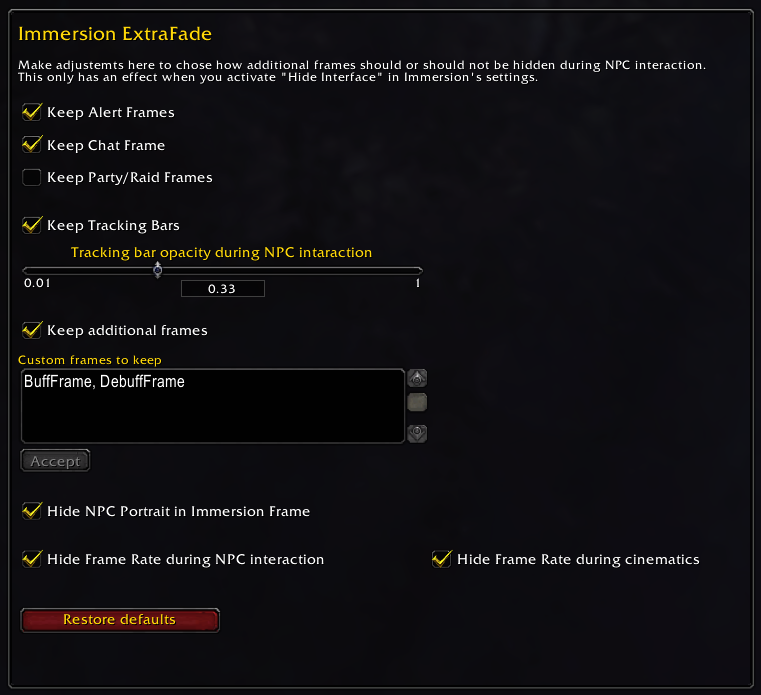
Video 1 (keep console and tracking bar):
Video 2 (hide tooltips of UI elements):
At-a-glance numbers
Performance highlights
- Peaked at Hot #83 on Jul 23, 2026.
- Featured on the Hot list across 6 distinct weeks.
- Shipped 3 releases in the last 30 days.
- Averaging 142 new downloads per day over the past week.
Visuals
Screenshots 2
Use real gameplay shots to assess the addon before installing.