Trend Explorer
Recent download momentum
Hourly download deltas for the last 48 hours.
About this addon
What it does
Description
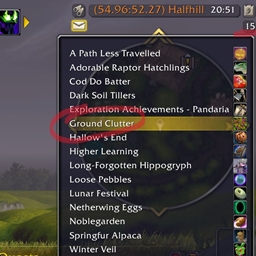
Allows you to adjust Ground Clutter on the fly - no need to locate it within the options menu system.
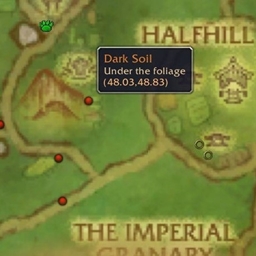
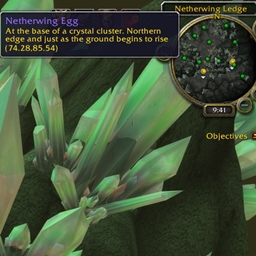
Ground Clutter is the optional grass and flowers that we see on the ground. It adds greatly to the beauty of the panorama but it can conceal small objects, especially ones that are deliberately difficult to see.
Excellent for Farming Hard to Find Objects
Vanilla / TBC / Wrath / Cata / Mists / Retail
How To Use / Configure
Instal like any other AddOn. Retail: Look for it in the AddOn Compartment in the top right of your screen. Left, Right, Middle, 4, and 5 mouse buttons control the behaviour when you click on "Ground Clutter". All versions: Enter "/gc" in chat
No More Cumbersome Opening/Navigating/Closing of Graphics Options!
Details
Retail: Open the AddOn Compartment. That's the tiny square with a number that is below your calendar, in the Minimap region of your screen (top right). Now click on the text that says "Ground Clutter" as follows:
- Left Mouse: Maximum clutter
- Right Mouse: Minimum Clutter
- Button 5: Increase by 1
- Button 4: Decrease by 1
- Middle Mouse FIRST click: Saves the current state and then toggles to the maximum or minimum, whichever is the furthest away. The saved state is retained until you /reloadui or logout.
- Middle Mouse Subsequent: If the state is not the same as the saved state then return to the saved state. Otherwise toggle to the furthest away of maximum and minimum.
Other: The "/gc" chat command gives the same options as for Retail. To keep it simple, just use "/gc t" successively.
Some yells refer back to game lore and some hint at finding companions and hunter pets. Mostly, it is all about carousing and pillaging!


At-a-glance numbers
Performance highlights
- Peaked at Hot #927 on Jul 21, 2026.
- Peaked at Rising #553 on Jul 21, 2026.
- Featured on the Hot list across 6 distinct weeks.
- Shipped 3 releases in the last 30 days.
- Averaging 21 new downloads per day over the past week.
Visuals
Screenshots 4
Use real gameplay shots to assess the addon before installing.