Trend Explorer
Recent download momentum
Hourly download deltas for the last 48 hours.
About this addon
What it does
gmExp
A very simple LDB experience display.
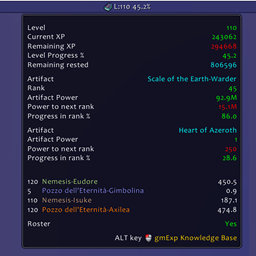
It shows in a broker display compatible the actual experience level and tracks Legion and BFA artifacts if equipped.
It shows also a simple un-ordered list of pg with their lvl and ilv.This can be modified by editing core.lua files:
local list_enable = true -- false to not show the list of pg
local list_maxpgnum = 23
An unused pg can be deleted using the /gmexp command, like this:
/gmexp Nemesis-Nomia
The names are case sensitive.
Requires a data broker display like chocolate bar, bazooka, ninjapanel, stat block, titan panel, docking station, buttonbin and more.
If you have anything to ask / comment / request please use:
http://www.wowinterface.com/downloads/info24174-gmExp.html
If you are interested in helping translating, please visit forum:
http://www.wowinterface.com/downloads/fileinfo.php?id=24174#comments
providing the following entries:
L["Shift"] = ""
L["Right-Click"] = ""
L["Left-Click"] = ""
L["Middle-Click"] = ""
L["Max content level"] = ""
L["Level"] = ""
L["Current XP"] = ""
L["Remaining XP"] = ""
L["Level Progress %"] = ""
L["Remaining rested"] = ""
L["Artifact"] = ""
L["Rank"] = ""
L["Artifact Power"] = ""
L["Power to next rank"] = ""
L["Power in excess in rank"]= ""
L["Progress in rank %"] = ""
L["Knowledge level"] = ""
L["Knowledge multiplier %"] = ""
L["Short Numbers"] = ""
L["Long Numbers"] = ""
Example in Italian:
L["Shift"] = "Maiuscola"
L["Right-Click"] = "Tasto-Destro"
L["Left-Click"] = "Tasto-Sinistro"
L["Middle-Click"] = "Tasto-Centrale"
-- and so on
Actually it supports for the following locale:
- enUS
- itIT
- zhTW and zhCN. Thanks to BNS
At-a-glance numbers
Performance highlights
- Peaked at Hot #1124 on Jun 30, 2026.
- Featured on the Hot list across 6 distinct weeks.
- Shipped 1 release in the last 30 days.
- Averaging 6 new downloads per day over the past week.
Visuals
Screenshots 3
Use real gameplay shots to assess the addon before installing.