Trend Explorer
Recent download momentum
Hourly download deltas for the last 48 hours.
About this addon
What it does
Original Addon: GladiatorlosSA This addon has been updated from Legion and beyond with permission from zuhligan of the previous project.
PLEASE UNINSTALL THE ORIGINAL GLADIATORLOSSA ADDON. GSA2 IS A SEPARATE ADDON, NOT AN EXTENSION. YOU WILL HAVE PROBLEMS IF YOU RUN BOTH.
Introduction
GladiatorlosSA is an addon created for the purpose of announcing the usage of crucial abilities cast by your opponents. No longer will you have to strain your ears specifically listening for the subtle swish of a rogue's kick, nor will you be oblivious to invisible abilities such as a monk's Revival. While tracking ability cooldowns is beyond the scope of this addon, you can stay fully informed about the events that are occurring right now to allow for quick reactionary play. Some incredibly powerful cooldowns, such as Incarnation, support alerts for both their application and their expiration!
GSA2 is an unofficial update of the original addon of the same name, updated to support the myriad of class changes that came with Legion, and now beyond! Although many crucial abilities have been added, no doubt more will continue to be added and the existing list further iterated upon as we discover what is important enough to be worth vocalized and as abilities get changed in the patches to come. Given that I have been playing since Vanilla with no signs of quitting, I will keep this addon up-to-date to the best of my ability in the foreseeable future, including into the expansions beyond!
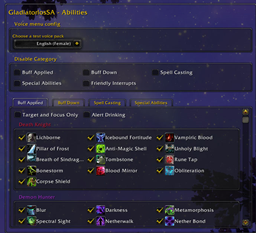
You can reach the options by opening the Interface menu, or you can simply type /gsa. Once you click the "Load Menus" button, a + will appear beside the GladiatorlosSA entry on the addon menu, where you can access the options.
Feature Listing
- Alerts major and sometimes invisible abilities, from Kicks to Ice Blocks and beyond! All abilities can be toggled via the options menu.
- Can call out the class that triggered their PvP trinkets in arenas!
- Generic "Big Heal", "Resurrection", "Dispel", "Purge", and major Crowd Control "success" alerts!
- Alerts "Drinking"! No longer will you be unaware that the healer with terrible mana conservation skills just drank their way to victory!
- Option for alerts to be exclusive to your focus and target! (Off by default)
- Alerts for when you or an ally successfully interrupts an ability!
- Throttle options to prevent the addon from becoming too noisy.
- Easily add custom abilities and sounds!
Localization
GladiatorlosSA2 is primarily designed for enUS. String and voice translations are left to other members of the community. Below is a list of localizations and the version which they were designed for. Out-of-date versions below should still function as normal, but may be missing sounds.
- All known translations are too far out of date to be supported, currently.
Volume Control
By default, GSA2 uses the Master Sound Channel, which very few (if any) default sounds are specifically hooked into. When you adjust the volume of GSA2, you modify the volume of the entire client - your Sound, Dialog, Ambience, and Music sliders will all need to be adjusted accordingly. You may change the sound channel in the options, however note that you are then sharing a channel with other in-game sounds and may not be ideal.
There is a simple way to modify GSA2 sound files themselves, however bear in mind that these changes may be overwritten with every update, depending on your method of updating. If you do this, it is recommended that all future updates are manual to prevent your changes from being reverted, or that you back up the folder. Remember that sounds may be added or replaced in future versions, so you will need to do the process occasionally to keep your voice volume normalized.
Guide to Changing GSA2 Voice Files (Thanks, bluesh34!)
Lower the volume through use of external programs, such as Audacity.
For Audacity:
- Go in File -> 'Edit Chains then click on Add in the bottom left of the window and enter a name for the script. (Example: AmplifyDown)
- Click on Insert in the bottom of the screen and choose Amplify in the list with a double click.
- Click on Edit Parameters then use the vertical/horizontal slider to amplify the dB by Negative (for exemple -5 is 50% less, so don't be loud on it) then click on OK twice to close the Amplify window.
- Click on Insert in the bottom of the screen and choose ExportOgg in the list with a Double Click.
- Click on OK to validate and close the Chains window.
With this script, you can apply it to all of the files, so:
- Go in File -> Apply Chain then select our script (AmplifyDown in my example) then click on Apply to Files....
- Look for the GSA2 voice pack folder (../Interface/AddOns/GladiatorlosSA2/Voice_enUS/.. by default), select all files by pressing Ctrl+A then click Open and the batch script will be applied on all the files within the specified folder.
- You can find your new files in a new folder named Cleaned
- Replace the original files with the newly modified file
My other addons:
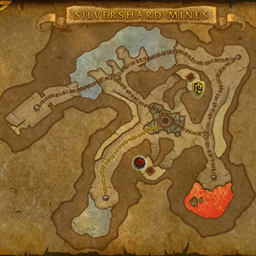
Silvershard Map Fix - Fixes the longstanding bug with the Battlefield Map (Shift+M) in Silvershard Mines where the carts would not display their controlling faction correctly.
Camp Twacker - Appends Return to Camp location info in the spell's tooltip for the Vulpera Make Camp and Return to Camp racials!
Please direct all feedback, questions, and comments to this project's Curseforge Page.
At-a-glance numbers
Performance highlights
- Peaked at Hot #860 on Jul 21, 2026.
- Featured on the Hot list across 6 distinct weeks.
- Shipped 1 release in the last 30 days.
- Averaging 44 new downloads per day over the past week.
Visuals
Screenshots 1
Use real gameplay shots to assess the addon before installing.