Trend Explorer
Recent download momentum
Hourly download deltas for the last 48 hours.
About this addon
What it does
GearLens Inspector
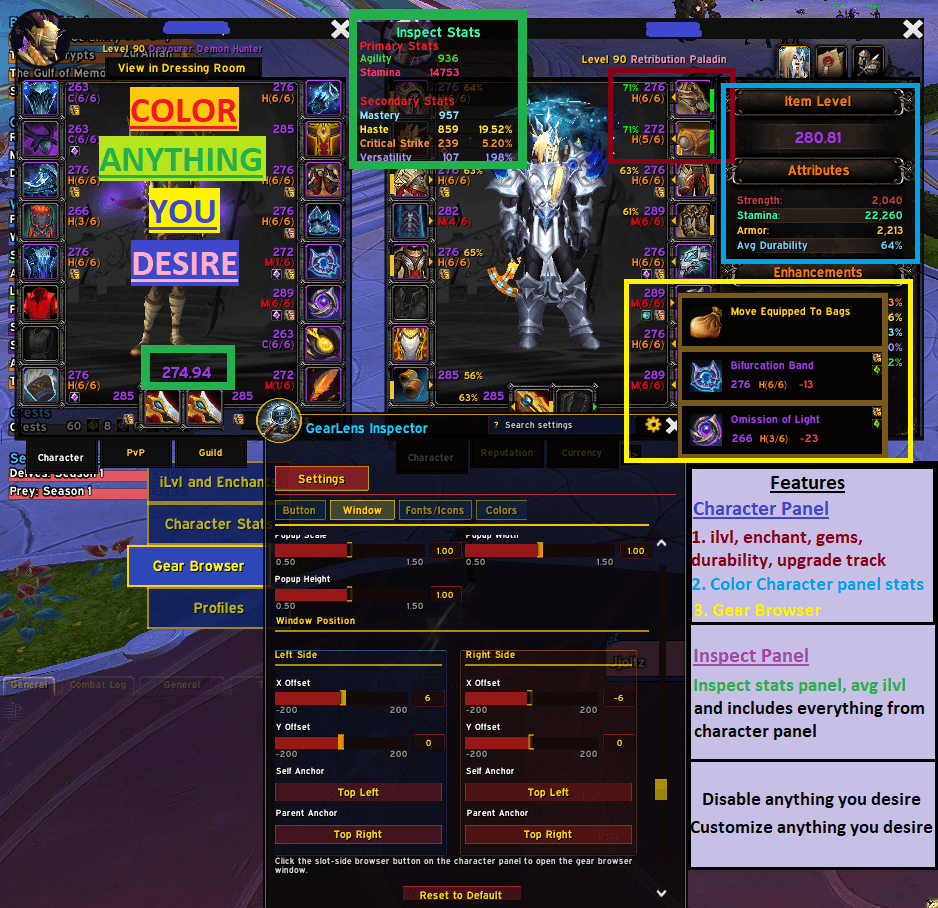
GearLens Inspector overlays detailed gear information directly onto the character paperdoll and inspect window — gem sockets, enchant status, item level, upgrade track, average item level, and a full gear stats panel — all fully configurable individually.
How to Access Settings
Type /gli in the chat box at any time to open the settings window.
Also accessible via Game Menu → Interface → AddOns → GearLens Inspector → Open /gli Settings.
NEW
- Global/Individual panel mode — Choose global settings for both character and inspect panels, or customize them individually if you like!
- Avg ilvl / Max ilvl for character panel (eg. 251/255)
- Reset all settings button.
- Reset to default settings on individual tabs
What It Does at a Glance
• Gem Socket Icons — filled gems show the gem icon with tooltip; empty sockets show a placeholder
• Enchant Icons — green scroll when enchanted, red warning icon when an enchant is missing
• Item Level — number on every slot, colored by item rarity or a custom color
• Upgrade Track — compact label e.g. C(4/8) showing tier and progress on every slot
• Inspect Overlay — all of the above appears on the inspect window when viewing another player
• Average Item Level — calculated average shown above the weapon slots on the inspect window
• Inspect Stats Panel — floating panel showing primary and secondary gear stats with percentage conversions
• Import/Export — share your full settings as a compact string; import settings from a string
Settings Summary
|
Tab |
What You Can Configure |
|
Feature Toggles |
Master on/off for character panel and inspect panel; individual toggles for sockets, enchants, item level, upgrade track, avg iLevel, stats panel; font face; menu transparency
|
|
Enchant & Sockets |
Icon size; X/Y offset; self and parent anchor — all configured independently for left-side and right-side slots |
|
Upgrade Track |
Font size; label width; X/Y offset; anchors; rarity or custom colour — left/right independently |
|
Item Level |
Font size; X/Y offset; anchors; rarity or custom colour — left/right independently |
|
Inspect Avg iLvl |
Font size; X/Y offset; anchors; rarity or custom colour for the inspect average item level label |
|
Inspect Stats Panel |
Sort order; font size; transparency; position and anchors; header/percent colour; per-stat colour overrides for all 4 primary and 9 secondary stats |
|
Import/Export |
Export all settings as a shareable base64 string; import settings from a string |
Credits:
Original by f1r3m1nd
At-a-glance numbers
Performance highlights
- Peaked at Hot #1515 on Jul 25, 2026.
- Peaked at Rising #832 on Jun 29, 2026.
- Featured on the Hot list across 6 distinct weeks.
- Shipped 1 release in the last 30 days.
- Averaging 13 new downloads per day over the past week.
Visuals
Screenshots 8
Use real gameplay shots to assess the addon before installing.


