
Explore with TomTom

by L3ca
Achievements 1 more category

TomTom achievement tracker and guide for exploration

WoW 11.2.0 Needs Update

Trend Explorer

Recent download momentum

Estimated downloads/hour over observed intervals in the last 48 hours.

Latest interval 0 /h 1h observed interval · ending Sep 11, 3 PM
Peak estimate +4 /h 1h observed interval · ending Sep 10, 5 PM
Average estimate +0.445 /h Time-weighted · 47.2h covered of 48h

Lines connect interval estimates, not hourly measurements. Unobserved time is not counted as zero or extrapolated to now.

About this addon

What it does

Key Features:

  • Automatic Waypoints: Guides you to unexplored areas based on account progression.
  • Real-Time Progress: Tracks your discovery and clears waypoints once an area is explored.
  • Zone Proxy Waypoints: If you're in the wrong zone, it directs you to the right one and sets new waypoints.
  • Updated Data: Includes accurate coordinates for all Classic and Retail zones needed to complete the Universal/World Explorer achievement.
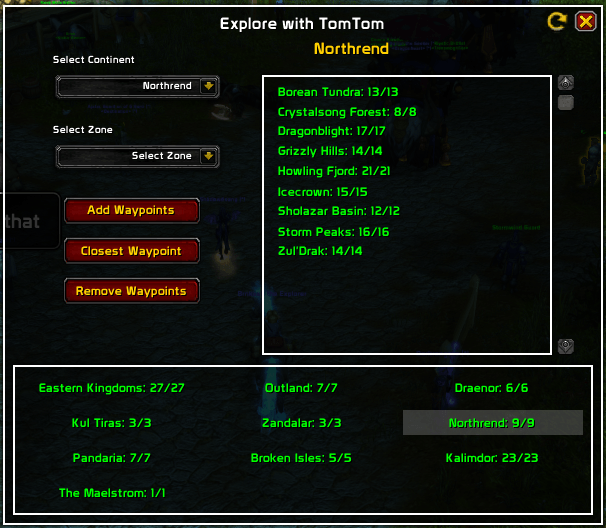
  • User-Friendly: Quick dropdown menus for selecting continents and zones.
  • Slash Command: Open with /ewtt.

Supported languages:
- EN / ES / FR / DE / IT / PT / RU

The flag of United States is often used to represent English, despite not being its origin The flag of United States is often used to represent English, despite not being its origin

Note: For certain areas (Blasted Lands, Uldum, Darkshore), speak with Zidormi to travel back in time.

Why Use Explore with TomTom?

It streamlines your exploration by only showing waypoints for undiscovered locations, helping you complete the Universal/World Explorer achievement faster.

  1. Install the Addons:

    • Download and install TomTom from CurseForge.
    • Install the Explore with TomTom addon.
  2. Getting Started:

    • Open the addon by typing /ewtt in the chat.
    • Select the Continent and Zone you want to explore.
    • Click Add Waypoints.
  3. Exploration Features:

    • Same Zone & Continent: If you're already in the selected zone, the addon will automatically populate your map with undiscovered waypoints.
    • Different Zone (Same Continent): If you're not in the zone but still on the same continent, the addon will create a proxy waypoint to guide you toward the correct zone. Once you arrive, it will generate waypoints for undiscovered areas.
    • Different Zone & Continent: The addon will print to chat that you are in the wrong continent.
  4. Happy Exploring!

    • Follow the waypoints and start uncovering new areas!

For support or suggestions, leave a comment. Enjoy your adventures!


If you’ve enjoyed using Explore with TomTom and found it helpful in your adventures, consider supporting its development. Every bit helps, and your contribution big or small allows me to keep refining and updating the addon for explorers like you. Click the donate button if you'd like to help out. Thank you for you contribution!

At-a-glance numbers

Performance highlights

  • Peaked at Hot #2416 on Sep 6, 2026.
  • Peaked at Rising #5706 on Aug 11, 2026.
  • Featured on the Hot list across 5 distinct weeks.
  • Shipped 1 release in the last 30 days.
  • Averaging 11 new downloads per day over the past week.

Visuals

Screenshots 6

Use real gameplay shots to assess the addon before installing.

Discover more

Keep exploring

Similar addons you might also want to check out.

More by L3ca

Same creator, different utilities.

Similar in Achievements

Comparable addons in the same lane.

ZamestoTV: Delves Helper #7
385.3K downloads

Useful functionality for Delves

Warband Nexus #13
157.8K downloads

All your alts in one window: account-wide item search, Great Vault & raid lockouts, currencies, reputations, professions, gold, mount try counter, collections, and weekly to-do plans. The alt manager built for Midnight warbands.

SpecBisTooltip Spec Bis List Tooltip #19
3.1M downloads

Shows if the item is BIS

RareScanner #49
136.8M downloads

RareScanner, a World of Warcraft addon to alert you when a rare, event or treasure appear in your minimap.

HandyNotes: Midnight (Treasures and Rares) #70
7.2M downloads

Officially a HandyNotes plugin for the Midnight expansion, showing where everything is: treasures, rares, achievements, secrets

SilverDragon - Rare Scanner #75
30.7M downloads

Scan for rare mobs so you can find them and their loot

RestedXP Guide #76
25.5M downloads

In-game Leveling Guides

Decor Vendor: Housing & Decor Emporium #85
4.7M downloads

Your ultimate tool for discovering and organizing WoW housing decor vendors.

Home Bound [12.1 Player Housing completionism] #91
6.0M downloads

Your ultimate companion for collecting housing rewards

Narcissus #95
13.0M downloads

An immersive character pane and in-game studio

Dungeon Screenshot #98 #1222
31.4K downloads

Dungeon Screenshot is an add-on for World of Warcraft that automatically takes a screenshot after completing a dungeon or raid. Its main purpose is to save memorable moments of your progress in the game without having to manually take screenshots.

Krowi's Achievement Filter #114
2.5M downloads

Achievement Filter completely replaces the default Achievements tab and adds several tabs to the Achievement Window that order the achievements by expansion, pvp, events or other curated lists.