Trend Explorer
Recent download momentum
Hourly download deltas for the last 48 hours.
About this addon
What it does
🛠️ Easy Cursor Hud Tooltip
Upgrade Your World of Warcraft Experience!
Introducing a simple yet powerful addon that transforms how you interact with the game:
🔹 Tooltips at Your Fingertips: All tooltips now appear right at your cursor! No more shifting your eyes to the screen's edge—get the information you need exactly where you're looking.
🔹 Auto Compare: Automatically compares gear when hovering over an item, without needing to hold the Shift key.
🔹 Keep your screen sleek and distraction‑free with simple tooltip control:
- With Shift + Mouse Hover: Tooltips for players, their pets, dungeon mobs, and NPCs only appear when you hold down the Shift key while hovering your mouse.
- Without Shift: You can enable this option to set the HUD Tooltip to be visible when hovering.
🔹 Instant Spell Info: Mouse hover over your action buttons and see spell details instantly at your cursor—ideal for rapid decision-making during intense battles.
🔹 Enhanced Auction House Browsing: Experience a custom tooltip design in the Auction House. Detailed item info pops up in a stylish dark gold theme right at your cursor, streamlining your shopping experience.
💡 Why You'll Love This Addon
🎯 Stay Focused on the Action: With information delivered directly to your cursor, you can keep your eyes on the gameplay without unnecessary distractions.
🎨Menu - Customize Your Experience: Easily adjust the HUD’s position and behavior using an intuitive configuration menu. You can either click the gear symbol near your minimap or type the command /hudconfig to open the settings.
🔗 Seamless Integration: Install and play—no complicated setup required! This lightweight, efficient addon works harmoniously with your existing interface and other addons.
🧠 Enhanced User Control: Decide when you want detailed info—simply hold Shift to see unit tooltips or hover for items and spells.
=============================Thank you===================
Hi,
I'm John Arana—the creator behind a World of Warcraft addon crafted to bring joy, clarity, and connection to our amazing WoW community. Whether it's through my addons, Twitch streams, or YouTube videos, I pour my heart into creating tools that make your gameplay smoother, more magical, and more fun.
To everyone who’s downloaded, visited my CurseForge page, or shared kind words—thank you. Your support has kept this passion alive, and I’m truly grateful.
If my work has ever made your WoW experience better, inspired you, or brought a smile to your face, I’d be deeply thankful for your donation. Every contribution helps me continue developing, improving, and sharing the kind of content that makes Azeroth feel like home.
Thank you for being part of this journey—and for helping me keep the magic alive.
 Donate via PayPal.
At-a-glance numbers
Performance highlights
- Peaked at Hot #1894 on Jul 28, 2026.
- Peaked at Rising #3028 on Jul 14, 2026.
- Featured on the Hot list across 6 distinct weeks.
- Shipped 1 release in the last 30 days.
- Averaging 8 new downloads per day over the past week.
Visuals
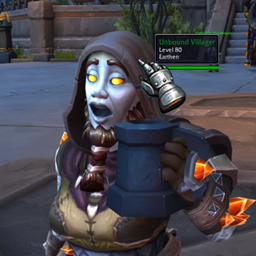
Screenshots 1
Use real gameplay shots to assess the addon before installing.