Easy Chat Channel Buttons

Chat & Communication

One-click chat switching, favorite numbered channels, and reusable phrases without losing your draft. Lightweight and ElvUI-friendly.

WoW 12.1.0 Actively Maintained

Trend Explorer

Recent download momentum

Estimated downloads/hour over observed intervals in the last 48 hours.

Latest interval 0 /h 1h observed interval · ending Sep 11, 8 PM
Peak estimate +2.01 /h 0.994h observed interval · ending Sep 10, 4 PM
Average estimate +0.276 /h Time-weighted · 47h covered of 48h

Lines connect interval estimates, not hourly measurements. Unobserved time is not counted as zero or extrapolated to now.

About this addon

What it does

Easy Chat Channel Buttons

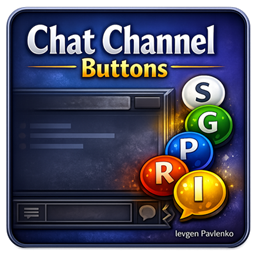
Easy Chat Channel Buttons adds a lightweight, movable bar of colored circular buttons for switching chat channels, opening favorite numbered channels, and inserting prepared phrases.

Instead of typing /s, /y, /em, /g, /o, /p, /raid, /i, /bg, or a changing numbered-channel command, you can choose the right chat with one click without losing anything you have already typed.

Create reusable phrase buttons for group instructions, greetings, recruitment messages, Mythic+ notes, roleplay, and other frequently used text. A phrase can keep the current chat or switch to a preferred channel before inserting its text at the cursor — it is never sent automatically.

The addon integrates cleanly with both the default World of Warcraft UI and ElvUI.


Features
  • Small colored circular buttons on a freely movable bar
  • One-click access to built-in chats and favorite numbered channels
  • Prepared Phrase buttons with custom text, tooltip, color, and preferred channel
  • Existing chat text is preserved when changing channels or inserting phrases
  • Active channel highlighting and dimmed inactive buttons while chat is open
  • Button colors match your personal chat color settings
  • Unavailable buttons hide automatically without leaving empty gaps
  • Individual built-in chat visibility controls
  • Horizontal or vertical layout
  • Any ordering of Built-ins, Numbered Channels, and Prepared Phrases
  • Adjustable button size, button spacing, and group spacing
  • Optional text labels for easier button identification
  • Optional comfortable click targets for very small bubbles
  • Saved bar position and visibility state
  • Lock, unlock, and reset-position controls
  • Minimap button:
    • Left-click opens settings
    • Right-click shows or hides the button bar
  • Compatible with the default UI and ElvUI
  • Lightweight and performance-friendly

Prepared Phrase Buttons

Each Prepared Phrase can have:

  • Custom text
  • Custom hover tooltip
  • Individual button color
  • A preferred chat channel
  • A custom position in the phrase list

Current is the default preferred channel. A phrase can also target Say, Yell, Emote, Guild, Officer, Party, Raid, Instance Chat, or Battleground. If the selected channel is unavailable, the phrase silently keeps the current chat instead.

Clicking a phrase inserts its text at the current cursor position without automatically sending the message. If chat is closed, the addon opens it first.

Use When Chat Has Text to control what happens when a non-empty draft is already open in another channel:

  • Use Preferred Channel — preserve the draft, switch its channel, and insert the phrase
  • Keep Current Channel — insert the phrase without switching the draft
  • Do Not Insert — leave a draft for another channel unchanged

Use Duplicate to copy a phrase together with its text, tooltip, color, and preferred channel. Arrow controls move individual phrases up or down, and the button bar updates immediately.


Favorite Numbered Channels

Save numbered zone and player-created chats such as General, Trade, Services, LocalDefense, or other active /N channels as account-wide Favorites.

  • Favorites follow channel-number changes automatically
  • Unavailable Favorites hide temporarily and return when the channel is available again
  • Button labels can show the current local channel number
  • Manage Custom Channels can add an available channel directly or by channel name or active /N
  • First-time setup adds the supported numbered channels available to the player once
  • The addon never joins or leaves channels
  • Community streams are not included

Phrase Export and Import

Prepared phrases can be transferred between characters, accounts, or installations.

  • Export Phrases creates a copyable export string
  • Import Phrases validates pasted data and asks for confirmation before replacing settings
  • Phrase order, text, tooltips, colors, preferred channels, and When Chat Has Text are preserved
  • Older phrase exports remain supported

Supported Built-in Chat Channels
  • Say — always available
  • Yell — always available
  • Emote — always available
  • Guild — available while you are in a guild
  • Officer — available when you have officer chat access
  • Party — available while you are in a party but not a raid
  • Raid — available while you are in a raid
  • Instance Chat — available while you are in an instance group
  • Battleground — available while you are in an instance group

Built-in buttons appear only when their chat type is available and enabled in settings. Hiding a normal channel button does not prevent a Prepared Phrase from using that otherwise available channel.


Layout and Accessibility

The settings panel lets you configure:

  • Button size from 10 to 32 px
  • Spacing between buttons
  • Group spacing from 10 to 60 px
  • Horizontal or vertical layout
  • Button Group Order for Built-ins, Numbered Channels, and Prepared Phrases
  • Optional button labels
  • Optional comfortable click targets
  • Built-in channel visibility
  • Prepared Phrases and favorite numbered channels
  • Bar lock state and position reset

Group order runs from left to right in horizontal layout and from top to bottom in vertical layout.


Slash Commands
/ecb or /ecb config  — open the settings panel
/ecb lock            — lock the button bar
/ecb unlock          — unlock the button bar for moving

Compatibility
  • World of Warcraft Retail / Midnight
  • Default World of Warcraft UI
  • ElvUI

The addon does not modify ElvUI. When ElvUI is loaded, button edges receive a subtle glow that matches its visual style.


Lightweight Design

The addon is intentionally focused:

  • No heavy frameworks
  • No unnecessary background processing
  • Simple configuration
  • Minimal performance overhead

Author

Created by Ievgen Pavlenko.

At-a-glance numbers

Performance highlights

  • Peaked at Hot #1024 on Aug 16, 2026.
  • Peaked at Rising #248 on Aug 17, 2026.
  • Featured on the Hot list across 5 distinct weeks.
  • Shipped 4 releases in the last 30 days.
  • Averaging 7 new downloads per day over the past week.

Visuals

Screenshots 1

Use real gameplay shots to assess the addon before installing.
Discover more

Keep exploring

Similar addons you might also want to check out.

More by IevgenPavlenko

Same creator, different utilities.

Similar in Chat & Communication

Comparable addons in the same lane.

RCLootScreen - A lootscreen for RCLootCouncil #24
57.9K downloads

A loot screen for better overview when RCLootCouncil is used

Raider.IO Mythic Plus, Raid Progress, and Recruitment #27
449.0M downloads

This companion addon for Raider.IO shows Mythic Plus scores, Raid Progress, and Recruitment status when hovering over players.

SpecBisTooltip Spec Bis List Tooltip #30
3.1M downloads

Shows if the item is BIS

Leatrix Plus #36
70.7M downloads

Powerful and modular quality of life addon with a small resource footprint. Supports all WoW games including Midnight and Burning Crusade Classic Anniversary (as well as all the others).

Whisper Messenger #40
65.8K downloads

A modern messenger-style whisper UI that replaces WoW's default chat whispers with a clean conversation window, contacts list and full message history.

GroupFinder(魔兽集合石) #64 #611
25.3K downloads

GroupFinder enhances group finding and Mythic+ management in WoW Retail with advanced filters, recruitment tools, specialization displays, Warband tracking, keystone information, and Great Vault progress.

Click Links Continued #68 #920
51.6K downloads

Turns URLs into clickable links and allows you to copy them

Raidstrats.gg - Raidplanner & Assignments #70 #412
16.7K downloads

Import, display, and live-sync raid strategies to effortlessly coordinate positioning and assignments with your entire team.

SilverDragon - Rare Scanner #74
30.7M downloads

Scan for rare mobs so you can find them and their loot

Routine - Knowledge Points & Rares #80
2.9M downloads

Midnight Quests, Knowledge Points Tracker, Prey Tracker, Curse Surge Tracking, Weekly and Catch-Up, Professions, Rares, Great Vault, Delves, Crests, Story Campaign, To-do list, Checklist, Alt Tracker, and more!

HandyNotes: MapNotes #93
4.9M downloads

MapNotes is a quality of life addon with a collection of icons & informations on various maps like Instance Entrance / Dungeon Location, Delves, Transport, Portal, Ship, Profession, Bank, Auctioneer, Innkeeper, Transmog and more

Fast Guild Invite #102
934.1K downloads

Addon for recruiting a guild.