
Trend Explorer
Recent download momentum
Hourly download deltas for the last 48 hours.
About this addon
What it does
📖 Description
Transform your World of Warcraft experience with Dynamic Immersive HUD - the intelligent interface addon that revolutionizes how you interact with your UI. Say goodbye to cluttered screens and hello to immersive gameplay that adapts to your needs. This mod show hud & hide hud dynamically.
🎯Why Choose Dynamic Immersive HUD?
Unlike basic interface hiding addons, Dynamic Immersive HUD thinks for you. It knows when you need your interface and when you don't, creating a seamless gaming experience that enhances immersion without sacrificing functionality.


✨ Core Features
🚀 Combat Intelligence
- Instant Response: Interface appears immediately when combat starts
- Smart Fade: Elegantly hides after combat with customizable timing
- Never Miss Actions: Full functionality during critical moments
- Override Protection: Prevents accidental hiding during fights
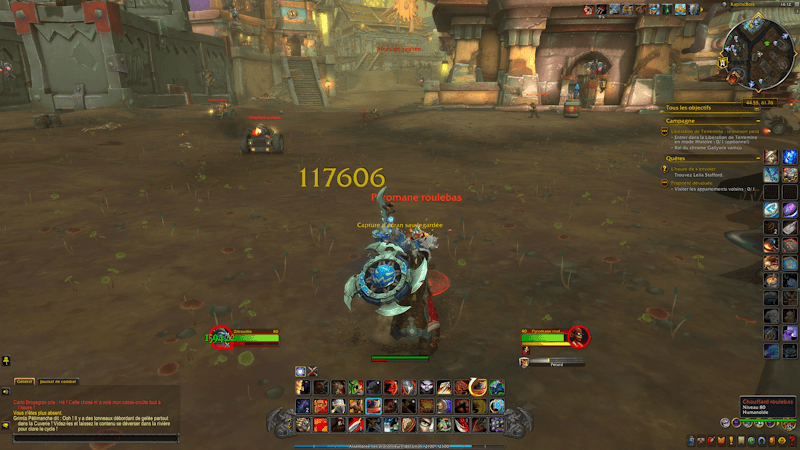
👆 Revolutionary Hover System
Transform your screen edges into smart reveal zones:
- 💬 Left Edge: Hover to show/hide chat with smooth animations
- ⚔️ Bottom Edge: Reveal action bars and main interface elements
- 🎯 Right Edge: Display side action bars and quest tracker
- 🔧 Fully Customizable: Adjustable zones, delays, and sensitivity
💬 Intelligent Chat Management
Never miss important communications:
- Auto-Display: Whispers, party, guild, raid messages trigger temporary chat
- Smart Timing: 8-second display with smooth fade transitions
- Message Filtering: Only important chat types trigger display
- Manual Override: Full control when you need it
🎒 Merchant-Aware Bag System
- Auto-Open: Bags appear when talking to vendors
- Context Sensitive: Knows when you're shopping vs. adventuring
- Manual Compatibility: Works alongside your preferred bag addons
- Instant Response: No delays when you need to access items
🎮 Perfect For
📸 Content Creators
- Clean Screenshots: No UI clutter in your captures
- Streaming: Professional-looking streams with smart UI management
- Video Production: Cinematic recordings without manual hiding
🎭 Roleplay Communities
- Immersive Experience: Focus on the world, not the interface
- Smart Chat: Never miss roleplay messages or important communications
- Flexible Control: Quick toggles for screenshots and events
🏆 Competitive Players
- Combat Ready: Full interface instantly available when needed
- Distraction-Free: Clean view for better situational awareness
- Performance Optimized: Minimal impact on game performance
🌟 Casual Gamers
- Set and Forget: Works automatically without configuration
- User Friendly: Simple controls with powerful features
- Enhancement: Improves gameplay without complexity
⌨️ Simple Yet Powerful Controls
Intelligent Hover
Move mouse to screen edges → Reveal hidden elements
Stay in zone → Keep elements visible
Move away → Smooth auto-hide
Comprehensive Commands
/hideui         → Toggle everything
/hideui bars    → Action bars only
/hideui chat    → Chat only
/hideui show    → Show all elements
/hideui reset   → Fix any issues
🔧 Advanced Customization
Keybind Flexibility
- Custom Binding: Use WoW's keybind interface in Options->Shortcuts->Add-ons
- Conflict Detection: Smart handling of existing bindings
- Multiple Options: Separate controls for different elements
⚠️ Compatibility Notes:
- May conflict with complete UI replacements
- Some TukUI overlap (both manage similar elements)
- Automatically detects and warns about conflicts
🚀 Easy Installation & Setup
Install
- Download from CurseForge
- Extract to
World of Warcraft/_retail_/Interface/AddOns/ - Restart WoW or type
/reload
First Use
- Hover screen edges to experience smart reveals
- Enter combat to see automatic display
- Customize keybinds if desired in Options->Shortcuts->Add-ons
No Configuration Required
- Works perfectly with default settings
- Smart detection adapts to your screen resolution
- Automatic optimization for different UI setups
📊 Performance & Quality
Lightweight Design
- Minimal Memory: Optimized for efficiency
- Smart Timers: Automatic cleanup prevents memory leaks
- Event-Driven: Only active when needed
- Performance Monitoring: Built-in optimization
Reliability
- Extensive Testing: Tested across multiple setups
- Error Handling: Graceful handling of edge cases
- Addon Compatibility: Thorough testing with popular addons
- Regular Updates: Active maintenance and improvements
🆘 Support & Community
Getting Help
- In-Game: Use
/hideui resetfor immediate issue resolution - Comments: Leave feedback on this CurseForge page
- Bug Reports: Detailed issue reporting welcome
- Feature Requests: Community-driven development
Quick Troubleshooting
- Not hiding? Check if you're in combat or try
/hideui reset - Hover issues? Verify mouse position and try
/reload - Keybind problems? Check Key Bindings > AddOns section
🎯 What Users Say
"Finally, an addon that gets it right! The combat detection is flawless and the hover system feels natural."
"Perfect for screenshots and streaming. My viewers love the clean look!"
"The chat system is genius - never miss guild messages but keep the screen clean."
🔮 Continuous Development
Current Version: 2.0.1
- Improved performance optimization
- Better addon compatibility
- Refined hover system
Coming Soon
- In-game options panel
- Custom hover zones
- Profile system
- Advanced timing controls
Transform your WoW experience today. Download Dynamic Immersive HUD and discover what truly immersive gameplay feels like.
📋 Technical Details
Compatibility: World of Warcraft 11.0.2 (The War Within)
File Size: ~50KB
Language: English (with multi-language notes)
Dependencies: None required
Performance Impact: Minimal
Categories: Interface Enhancements, UI, Immersion, Combat, Screenshots
At-a-glance numbers
Performance highlights
- Peaked at Hot #3675 on Jul 26, 2026.
- Peaked at Rising #4667 on Jul 26, 2026.
- Featured on the Hot list across 6 distinct weeks.
- Shipped 1 release in the last 30 days.
- Averaging 3 new downloads per day over the past week.
Visuals
Screenshots 2
Use real gameplay shots to assess the addon before installing.