
Trend Explorer
Recent download momentum
Hourly download deltas for the last 48 hours.
Latest hour +0 Jul 26, 3 PM
Peak hour +2 Jul 27, 8 AM
Average +0 per hour
About this addon
What it does
Delvin
Commands:
Track weekly delve runs and view progress within the Great Vault UI.
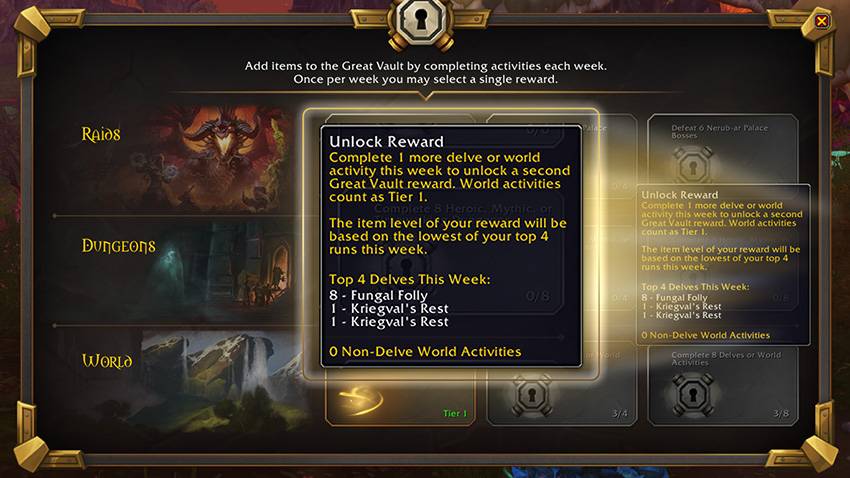
Tired of not being able to tell how many high-tier delves you've run when you hover over Great Vault rewards? Problem solved! Delvin brings weekly progress tooltip information to the World activities row of your Great Vault, just like you're used to for the "Raids" and "Dungeons" vault row tooltips.
Commands:
Typing "/delvin" into the chat box will display all your delve runs for the week in this format in chat:
8 - Kriegval's Rest
8 - Fungal Folly
8 - Earthcrawl Mines
7 - Fungal Folly
1 - The Waterworks
8 - The Waterworks
Features:
- Intuitive tooltip functionality for Great Vault interface
- Tracking information (delve tier and name) for completed delves during the current week
- Information on the number of other Tier 1 World activities completed during the week
**** Important Notes ****
- Delve completion information is stored locally (client-side)
- Because of how Delvin data is tracked and stored, Delvin can only start tracking delve progress once installed. This means if delves have already been completed before Delvin installation, those runs will not be tracked.
- You can manually edit your character's progress, if you know it, by going to ...\World of Warcraft\_retail_\WTF\Account\[ACCOUNT NAME]\[SERVER NAME]\[CHARACTER NAME]\SavedVariables - Delvin.lua and editing the Delvin run table. Format should be:
Delvin_Table = {
{["zone"] = "The Dread Pit", ["tier"] = "1",},
{["zone"] = "The Dread Pit", ["tier"] = "2",},
}
- You can manually edit your character's progress, if you know it, by going to ...\World of Warcraft\_retail_\WTF\Account\[ACCOUNT NAME]\[SERVER NAME]\[CHARACTER NAME]\SavedVariables - Delvin.lua and editing the Delvin run table. Format should be:
- Delvin should automatically reset after the weekly server reset.
Future Plans:
- Add more options for /delvin slash commands
At-a-glance numbers
Performance highlights
- Peaked at Hot #1882 on Jul 24, 2026.
- Peaked at Rising #5733 on Jul 23, 2026.
- Featured on the Hot list across 6 distinct weeks.
- Shipped 1 release in the last 30 days.
- Averaging 7 new downloads per day over the past week.
Visuals
Screenshots 1
Use real gameplay shots to assess the addon before installing.