Trend Explorer
Recent download momentum
Hourly download deltas for the last 48 hours.
About this addon
What it does
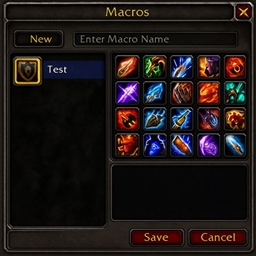
ClassMacros is a lightweight World of Warcraft addon that gives you instant access to a curated library of class-specific and shared utility macros—all from a single, easy-to-use window.
Key Features
-
Class & Shared Macro Sets
Select your class (Death Knight, Demon Hunter, Druid, Evoker, Hunter, Mage, Monk, Paladin, Priest, Rogue, Shaman, Warlock or Warrior) or the Shared category via a dropdown menu. -
One-Click Macro Creation & Pickup
Click any macro link to automatically create the macro (if it doesn’t already exist) and pick it up on your cursor—no manual typing or copy-pasting required. -
In-Game Tooltip Previews
Hover over a macro link to see its full name and body in a tooltip before you create it. -
Persistent Settings
Remembers whether the window was open or closed, minimap icon visibility/position, and debug logging preference between sessions via theClassMacrosDBSavedVariables. -
Configurable via Blizzard’s Settings UI
Under Interface → AddOns → ClassMacros, toggle the minimap icon or enable verbose debug output without touching any code. -
Optional Minimap Icon
Integration with LibDataBroker (via LibDBIcon-1.0) lets you show or hide a minimap icon for quick access
Usage
-
Open the ClassMacros panel by clicking the minimap icon (if enabled) or via Interface → AddOns → ClassMacros.
-
Choose your class or Shared in the dropdown at the top.
-
Hover over any macro link to preview its contents.
-
Click to create the macro and pick it up—then drag it into your Macro Window or action bar.
Enjoy faster, cleaner macro management—no more digging through spreadsheets or forums mid-combat!
At-a-glance numbers
Performance highlights
- Peaked at Hot #4327 on Jun 28, 2026.
- Peaked at Rising #5096 on Jul 28, 2026.
- Featured on the Hot list across 6 distinct weeks.
- Shipped 1 release in the last 30 days.
- Averaging 1 new downloads per day over the past week.
Visuals
Screenshots 1
Use real gameplay shots to assess the addon before installing.