Trend Explorer
Recent download momentum
Hourly download deltas for the last 48 hours.
About this addon
What it does
A World of Warcraft addon that adds convenient access to Check-PvP.fr player profiles through right-click context menus. Supports LFG search results and applicants.
NEW in v1.4.0: In-Game Options Menu! Configure all addon settings directly through the game's Interface Options panel.
🎯 Key Features
- Right-click integration: Access Check-PvP through "Check PvP" context menu option
- Comprehensive coverage: Works on LFG menu, targets, party members, raid members, guild members, friends, enemies, and yourself
- LFG integration: Generate URLs for players in LFG search results and applicants
- Cross-realm support: Properly handles players from different realms
- Region detection: Automatically detects your region (US, EU, KR, TW, CN)
- Realm translation: Converts internal realm names to Check-PvP.fr format
- Dual Copy Modes: Switch between name-realm mode (default) and full URL mode
- Persistent settings: Your copy mode preference is saved between sessions
- Version-Specific URLs: Automatically uses the correct Check-PvP URL for your game version
- In-Game Options Menu: Configure all settings through Interface Options → AddOns → CheckPvP Assistant
Available Slash Commands
/checkpvpor/cpvp- Show available commands/checkpvp usename- Switch to name-realm mode (default)/checkpvp useurl- Switch to URL mode/checkpvp mode- Show current copy mode/checkpvp autoclose- Toggle auto-close dialog after copy
In-Game Options Menu
Access the addon settings through the game's Interface Options:
- Open Interface Options: Press
Esc→Interface - Navigate to AddOns: Click on
AddOnsin the left sidebar - Select CheckPvP Assistant: Find and click on "CheckPvP Assistant" in the addon list
- Configure Settings: Use the options panel to adjust:
- Copy Mode: Choose between "Name-Realm" (default) or "Full URL" mode
- Auto-Close Dialog: Enable/disable automatic dialog closing after copying
- Debug Mode: Enable debug output for troubleshooting
The options panel provides a user-friendly interface for all addon configuration, with changes applied immediately and saved automatically.
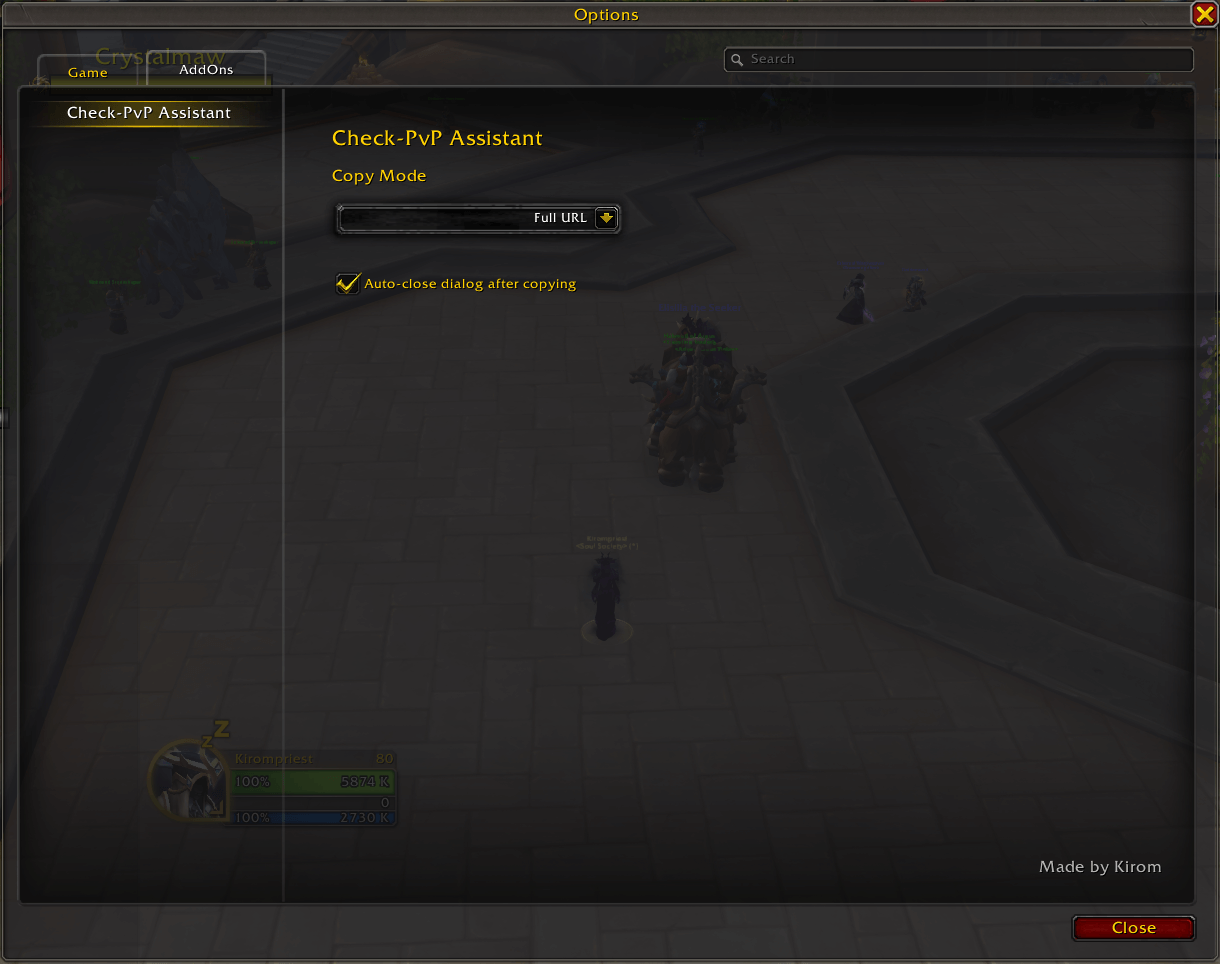
The CheckPvP Assistant options panel in the game's Interface Options menu
Usage
- Right-click on any player (target, party member, raid member, guild member, friend, enemy, or yourself)
- Look for "Check PvP" in the context menu
- Click the option to open a dialog with either name-realm or Check-PvP.fr URL (depending on your copy mode)
- Press Ctrl+C to copy the text to your clipboard (dialog auto-closes by default)
- Press Enter or Escape to close the dialog manually (if auto-close is disabled)
- Use the copied content:
- Name-Realm copy mode: Paste into Check-PvP.fr search bar or use in Discord/chat for example
- URL copy mode: Open directly in your browser
Screenshots & Examples
Basic Usage Example
Step 1: Right-click on your character
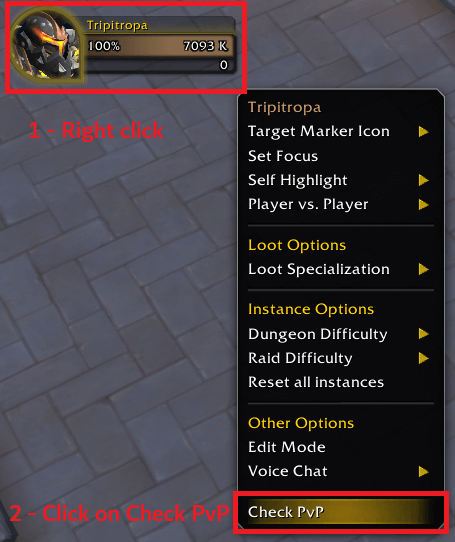
Right-click on your character to see the "Check PvP" option in the context menu
Step 2: Check PvP Dialog appears
The dialog that appears depends on your current copy mode:
Name-Realm (default):
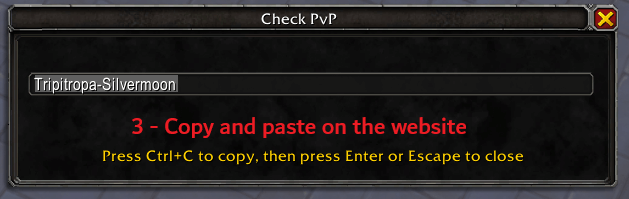
Dialog showing name-realm ready to copy (Press Ctrl+C to copy)
Full URL:
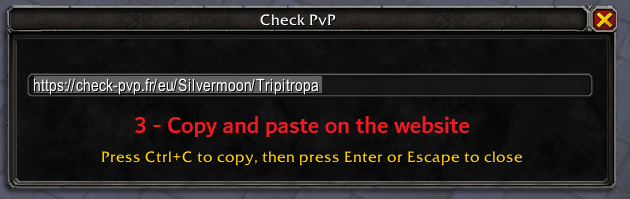
Dialog showing Check-PvP.fr URL ready to copy (Press Ctrl+C to copy)
Step 3: Using the copied content
- If in Name-Realm copy mode: Use the "PlayerName-RealmName" to paste into website search bar and open character profile
- If in Full URL copy mode: Open the URL in your browser to view character profile
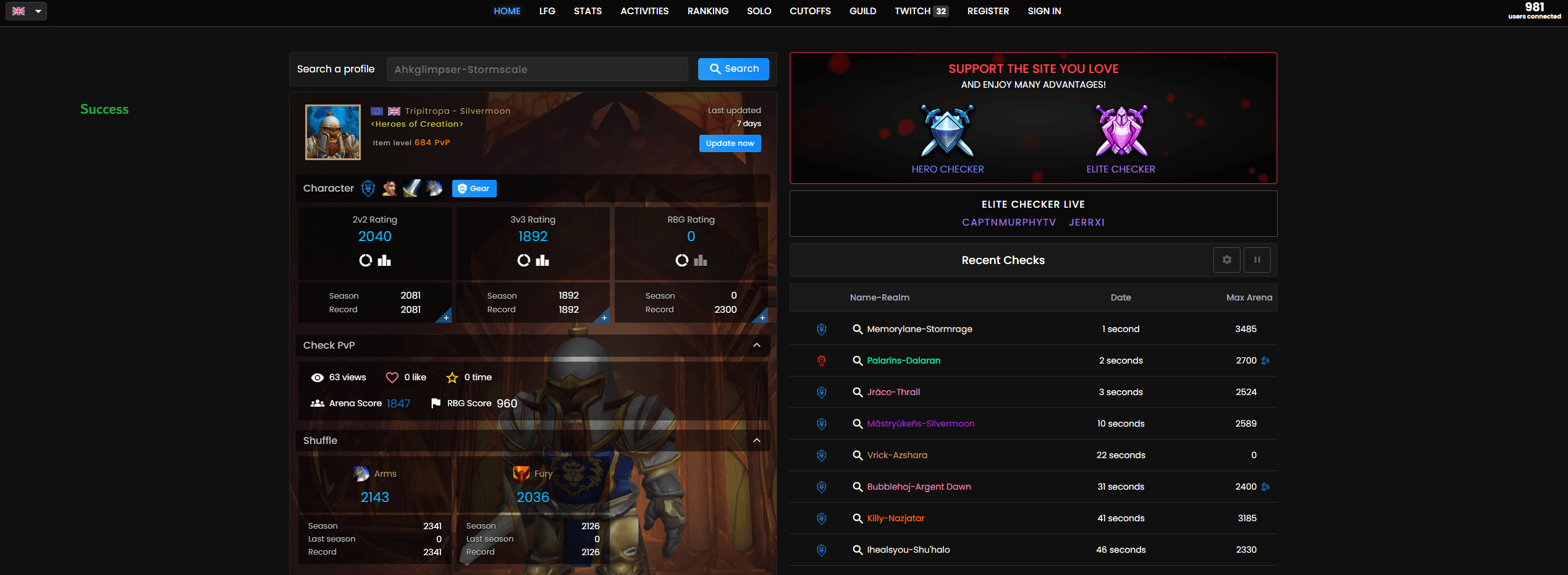 Example of Check-PvP.fr showing player's PvP statistics and profile
Character Not Found - Step by Step Fix
If the website shows "character not found", you can manually search for them (this will fetch the latest data on the website and make the profile appear):
Step 1: Character Not Found Error  The error message when a character is not initially found
Step 2: Copy Character Information  Copy the character name and realm from the error message
Step 3: Manual Search  Paste the information into the search bar and search manually
Step 4: Character Found 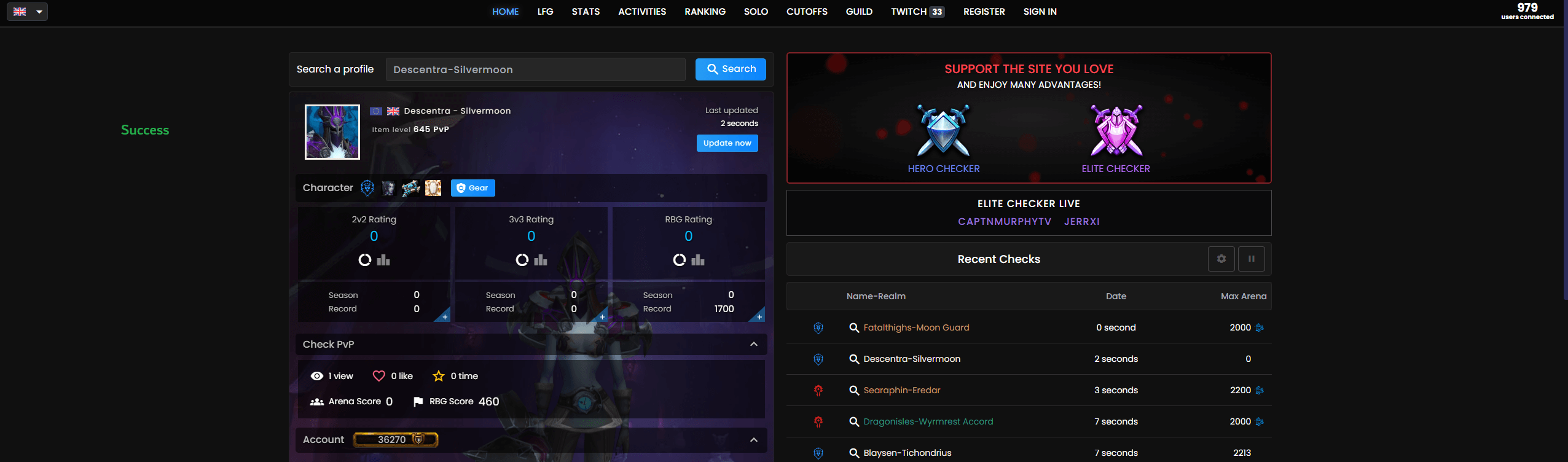 The character profile after manual search (fetches latest data from Blizzard's servers)
Additional Player Sources
The addon works with players from various sources:
| Context | Screenshot |
|---|---|
| LFG Creator | 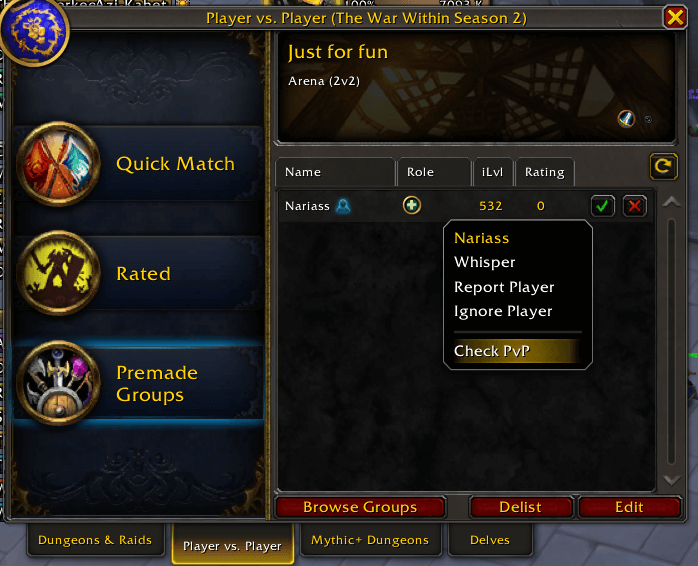 |
| LFG Seeker | 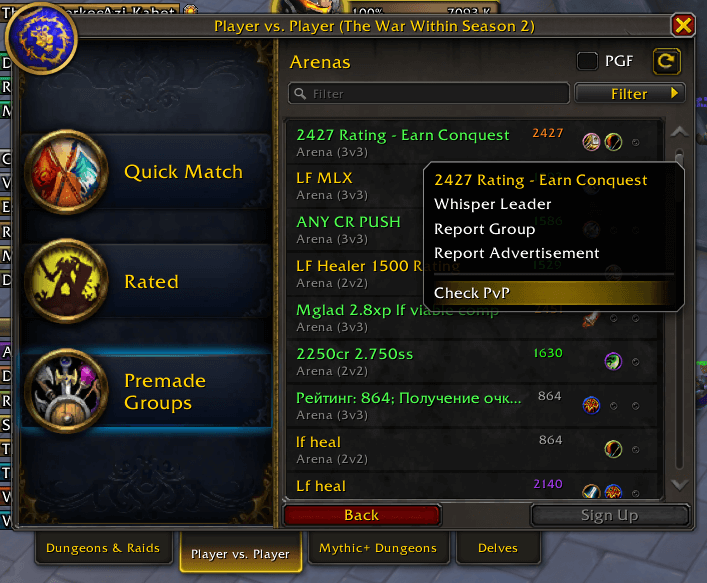 |
| Guild Member | 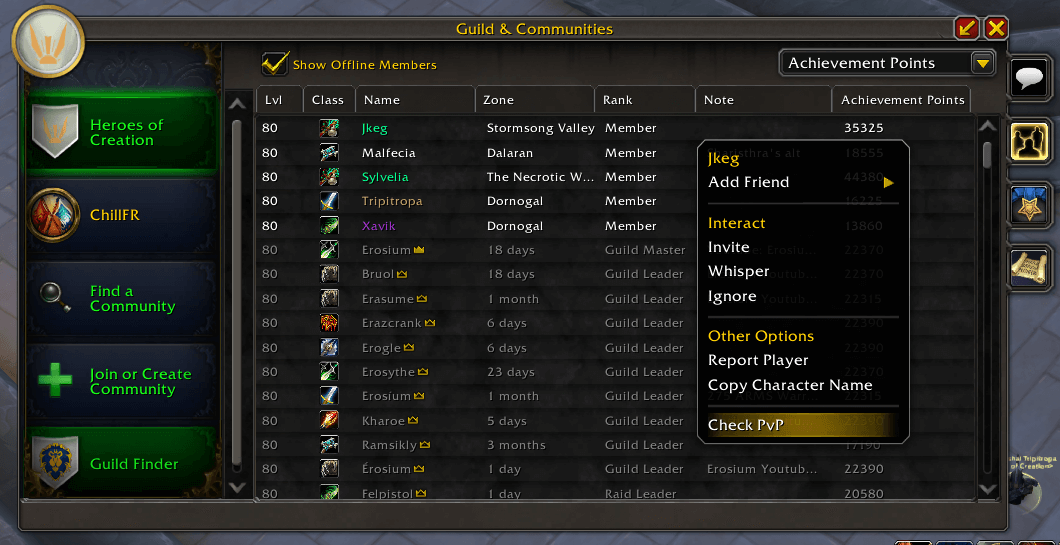 |
| Community Member | 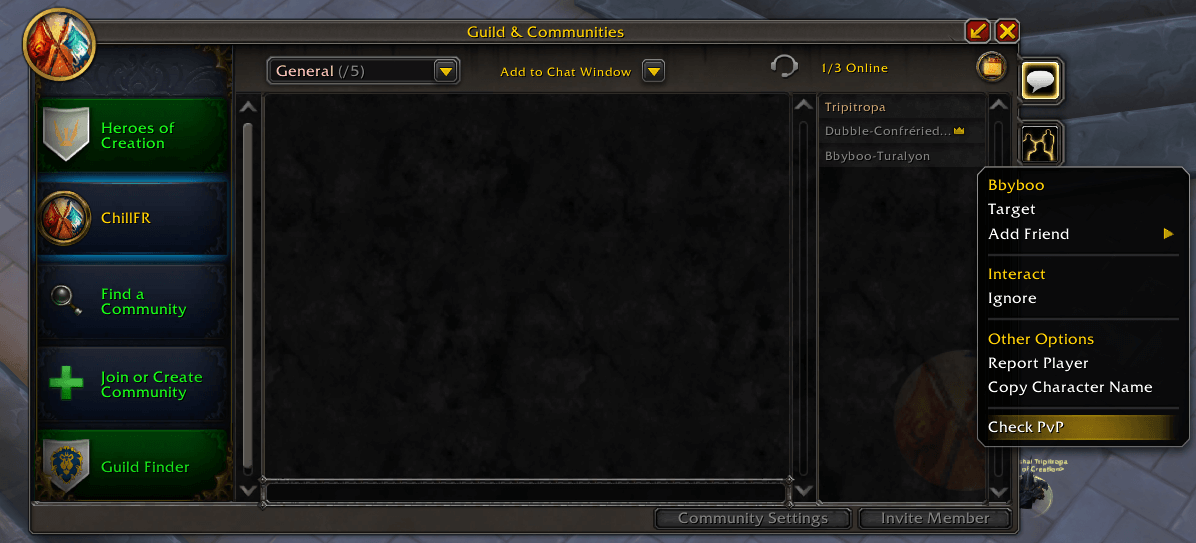 |
Supported Contexts
The addon works in multiple contexts as demonstrated in the screenshots above:
- Guild members - Right-click in guild roster
- Community members - Right-click in community member list
- LFG creators - Right-click on group leaders in LFG browser
- LFG seekers - Right-click on players looking for groups
- Your own character - Right-click on yourself
- Target players - Right-click on any targeted player
- Party members - Right-click in party frames
- Raid members - Right-click in raid frames
- Friends list - Right-click on friends
- Battle.Net friends - Right-click on Battle.Net friends
- Enemy players - Right-click on opposing faction players
📞 Support & Feedback
For bug reports, feature requests, or general feedback:
- Discord Community - Join our Discord server for real-time support and discussions
- GitHub Issues - CheckPvPAssistant Issues
- Documentation - See README.md for detailed usage instructions and screenshots
Discord Community
Join our Discord server to:
- Get real-time help with the addon
- Report bugs and suggest features
- Share screenshots and experiences
- Connect with other PvP players

Happy PvP hunting! 🗡️⚔️
At-a-glance numbers
Performance highlights
- Peaked at Hot #793 on Jul 22, 2026.
- Peaked at Rising #841 on Jun 29, 2026.
- Featured on the Hot list across 6 distinct weeks.
- Shipped 1 release in the last 30 days.
- Averaging 35 new downloads per day over the past week.
Visuals
Screenshots 6
Use real gameplay shots to assess the addon before installing.