Trend Explorer
Recent download momentum
Hourly download deltas for the last 48 hours.
About this addon
What it does
About
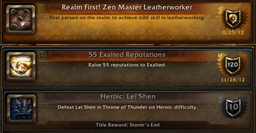
Character Achievements is an addon that modifies the display of achievements in order to easily distinguish those earned by your current character and those earned by another character on your account. A check button is added to the Achievement Frame that allows for quick and easy switching between the styles and updates your achievement points accordingly.
Character Style
The display is broken down into 3 parts:
- Character Achievements - default display of completed achievements (red title background/border)
- Account earned Achievements - blue bordered display with slight coloration and lighting.
- Not Completed Achievements - default display of incomplete achievement.
Account-earned Style
The default display is used except:
- account-earned achievements have a blue border instead of red.
Note
- Character points for toons that are not in a guild requires a work-around due to limitations set by Blizzard. It will force an inspect with self once on each login and when an achievement is earned in order to determine the correct points.
- Account-earned achievements are considered those that have been earned by any character on your account (except your current character). It is different than Blizzard's Account-wide achievements; achievements that have a shared progress across all characters. These are the ones that have the blue title background and border.
Slash Commands
- '/ca' or '/characterachievements'
- '/ca options' or '/ca gui' brings up the options menu.
- '/ca reset' resets to default settings and button position.
- '/ca account' enables the display style for account-earned.
- '/ca character' enables the display style for character.
- '/ca unlock' unlocks the button for movement.
- '/ca lock' locks the button.
- '/ca hide' hides the button from the achievement frame.
- '/ca show' shows the button on the achievement frame.
Bug Tracker / Feature Requests
Please submit Bugs and/or Feature Requests using the Ticket System on the CurseForge Project page. Please provide as much information as possible, including your client language, the exact version you are running, how to reproduce any errors, and a stack trace, if applicable.
At-a-glance numbers
Performance highlights
- Peaked at Hot #1599 on Jul 4, 2026.
- Featured on the Hot list across 6 distinct weeks.
- Shipped 1 release in the last 30 days.
- Averaging 9 new downloads per day over the past week.
Visuals
Screenshots 4
Use real gameplay shots to assess the addon before installing.