Trend Explorer
Recent download momentum
Hourly download deltas for the last 48 hours.
About this addon
What it does
Helps with logic execution of Actions for the player. Actions are Spells, macros or items.
Castomatic allows a player to create Action Sequence(s) and adjust the behavior of these sequence(s) and the actions within them and bind them to hotkeys.
Sequences are order actions that a player will take based on options set by the user. Such options can include % of life, buffs active, mana left and so forth. Each action has its own criteria for when it will be activated by the player.
Forums now open
New forums are now open for Castomatic. You can find them here: https://castomatic.boards.net/
There you can post and find sequences from other players, ask questions, request features, see what work is in progress and much more.
Intro
When you first install the addon, you will see a News tab. This tab is auto displayed after each update of the addon and will let you know what was updated.
The first tab that will be used in daily play will be the General tab.
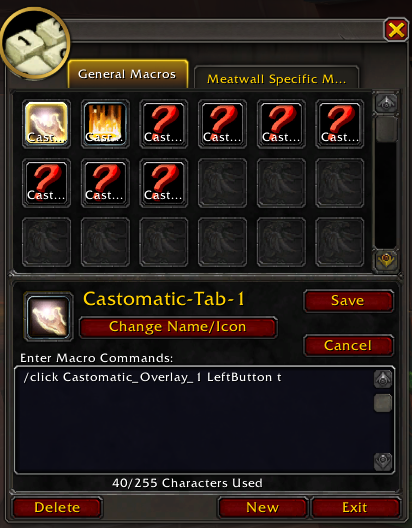
Castomatic uses Macros for each sequence. These Macros are Automatically generated and are based off the Sequences the user has created. Just find the Macro you want and drag it to your Action Bar.
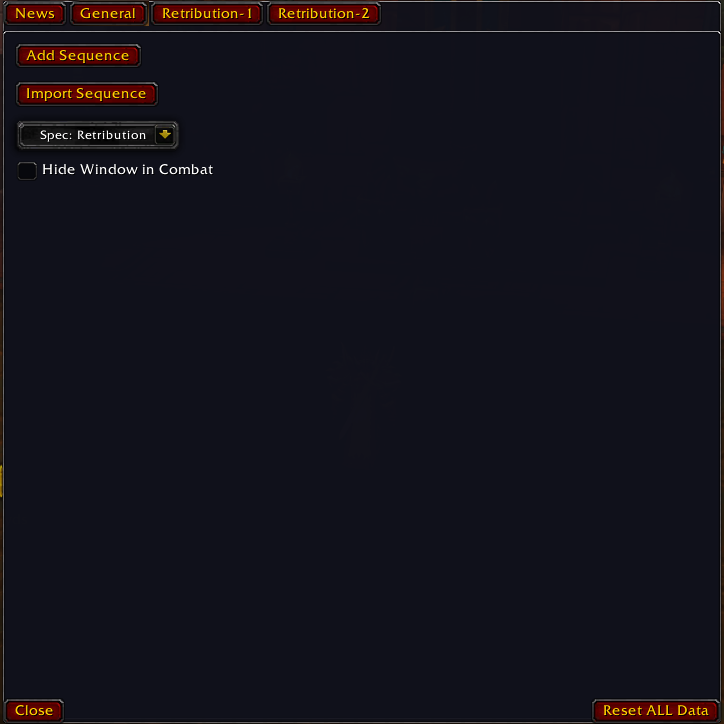
General Tab
This tab has the settings that effect all Sequences the player has on this character and is character dependent.
Current actions you can take on the general tab are Add Sequence, Import Sequence, Change sequences that are active by player spec, and whether or not to auto hide the Castomatic window when entering combat.
Add Sequence
This will create a new ordered sequence tab. These sequence tabs are where the user will create and modify what actions and how when they will be used. Please see the section on Sequence Tab for more details.
Import Sequence
This will open a window to allow a user to paste a sequence that was generated on another character or another user. The text to put in here can be found in the "Export Sequence" window on the "Sequence Tab". Please see the "Export Sequence" section below for more details.
Spec drop down
Changes what Sequences are active and show in Castomatic for the spec that is picked. This will NOT change your characters specs. This is mainly used to see what sequences you have without changing your player spec.
Hide window in combat
If this is checked, the Castomatic window will automatically hide itself when you enter combat. During normal play you will want to keep this checked. If you are testing your sequence and want to see what some actions were done, having the window open on the Sequence Tab you are using will give extra details. Please see the "Sequence Tab" section for more details.
Reset ALL Data
This will remove all sequences and custom settings in the addon. Returning it back to a fresh install state. This should only be used in extreme cases where the addon data is really bad.
Sequence Tab
This is where the bulk of your interaction will happen in Castomatic. This is where you will fill out your sequences, adjust the behavior of the sequences and each action, as well as see details on what the sequence is doing.
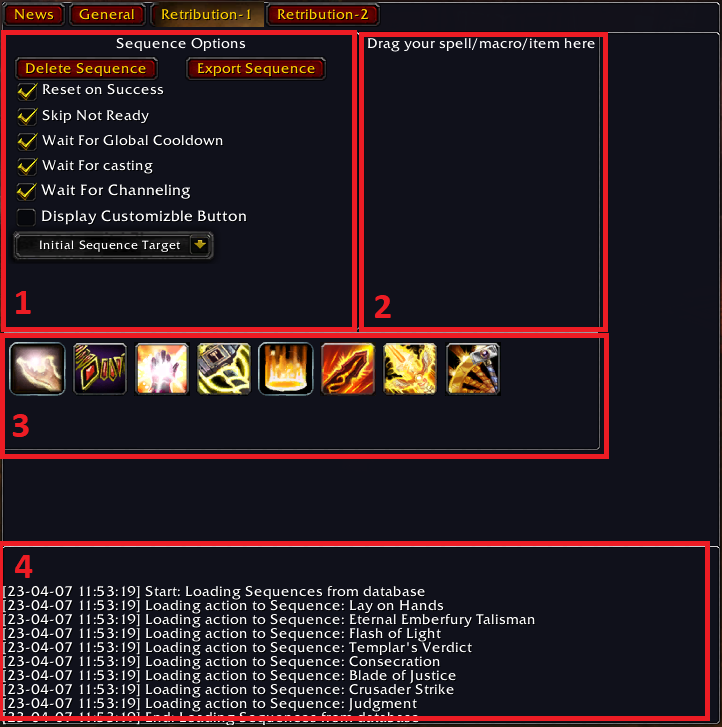
Details
- General Sequence Options
- Drag Area
- Current Sequence
- Sequence Log
Behavior
Actions are preformed in the order you see. An Action can either be Ready or Not Ready based on options the user sets on the actions as well as WOW checks like spell cooldowns. Please see the Action section for more details and options you can set.
Castomatic will test the Active Action for Ready, if the action is Ready, the addon will preform that Action for you. If the action is Not Ready then the addon will either wait for Ready or move onto the next Action that is Ready based on options set by the user.
Sequence can be reordered and checked after creation.
General Sequence options
These options effect the behavior of the entire sequence.
Reset on Success
When checked, Castomatic will restart back at the start of the sequence for the next action to execute. This option should only be used with Skip Not Ready.
When it is unchecked, the addon will perform each action in order.
Example
You player will cast Action 1, the addon will test Action 1 for Ready, if you have Skip Not Ready checked, the addon will then move to Action 2 and test for Ready. If its Ready, it will be cast, if its Not Ready, it will continue to 3 and so forth. Once a Ready action is found, in example Actoin 3, the addon will execution that action (aka cast the spell) then start at Action 1 again to find the next Ready action.
Skip Not Ready
If the Active Action is Not Ready the addon will continue to check the next Action until it finds a Ready one of until it has gone through all actions and is back at the one it started on.
Wait For Global Cooldown
This should very rarely be unchecked
If checked, the addon will wait for the global cooldown to be over before it checks for next Ready Action
If unchecked, the global cooldown will count towards Not Ready The only time to have this unchecked is if you have actions without a global cooldown.
Wait for casting
If checked, the addon will wait for any currently casting spells to finish before it checks for next Ready Action
If unchecked, the addon will interpret your current spell casting if it finds a Ready Action
Wait for channeling
If checked, the addon will wait for any currently channeling spells to finish before it checks for next Ready Action
If unchecked, the addon will interpret your current spell channeling if it finds a Ready Action
Targeting Dropdown
This will set a target for the sequence if one is not found. This will NOT change a current target.
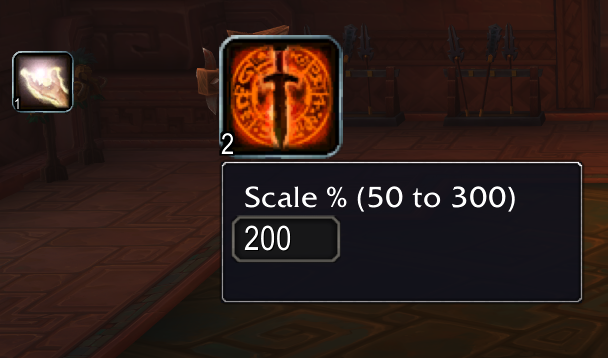
Display Customizable Button
A clickable, draggable, sizable button that will execute the same functionality as the macro.
To move and scale the button, right click to open the option screen. It will then be movable and scalable.
Drag Area
Drag Actions to this area to add them to the end of a sequence.
- Spells from your spell book
- Macros from your macro window
- Items from your equipped slots
Sequence Display
This area will display the current ordered Actions in the sequence. Once an Action is dragged to the Drag Area it will appear in this area.
Actions can be dragged to change their order.
Right clicking on an Action will bring up the Action Options window. Please see the Actions section for more details.
Sequence Log
Here you will find details of what the addon is doing with the sequence. It will show why an Action is Ready or Not Ready what was loaded and any other detailed information.
Action Options
This window is used to change the behavior for a given Action.
It is opened and closed by right clicking the action to modify
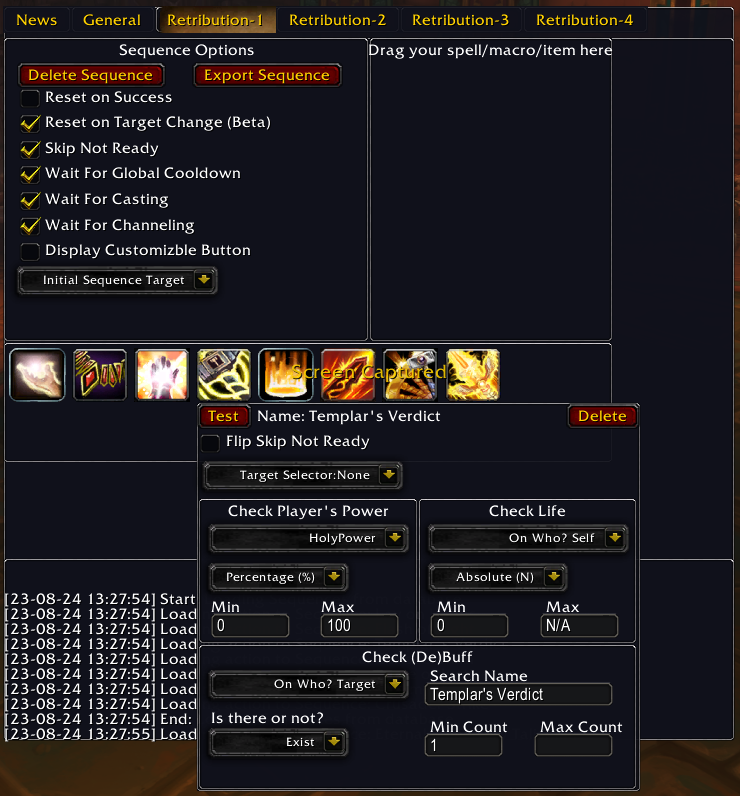
Flip Skip Not Ready
This will "flip" the "Skip Not Ready" flag on the Sequence Option.
So, if the Sequence has "Skip Not Ready" checked, this action would normally be skipped when it can't be cast. But if you check the "Flip Skip Not Ready" The Sequence will stop and wait for this action to be ready before moving forwards.
Target Selector
Only useable for Spells
This will set the Target for this action. This is done using the Macro Target options. The addon turns your Spell into a macro and adds the "Target Selector" to that macro.
Some of the possible targets:"@player", "@target", "@mouseover", "@pet". See in-game dropdown for my options.
Power Selector
Action will test the players power(resource) amount before casting. Any player power (mana, rage, soulshards, etc...) can be used.
Examples could be:
- "Cast 'Hand of Gul'dan' when Soul Shards Min 5" This will try to cast "Hand of Gul'dan" whenever the player has 5 Soul Shards.
- "Cast small heal if mana is almost empty. Cast big heal is mana is almost full"
Check (De)Buff
Will have the addon check if the player or target has a set buff or debuff on them before casting a spell.
To check if a (de)buff is active
- Pick who to check:
targetorself - The search text will auto populate with the Spell name
- Update the search text if its not correct
- Pick if you want to check if the (de)buff is existing or missing
- If it exist, new options for Min and Max Count will be displayed.
- Min will be 1 and can not be less than 1.
- Max will be blank/empty. This means no Max is checked.
Examples could be:
- "Cast 'Hand of Gul'dan' when Soul Shards Min 5" This will try to cast "Hand of Gul'dan" whenever the player has 5 Soul Shards.
Customizable Button
I want to extend a special thanks to the following sites for helping make this Addon come to life.
- https://wowwiki-archive.fandom.com/wiki/Wiki
- https://www.codeproject.com/Articles/284961/A-Simple-World-of-Warcraft-Addon-using-Lua
- https://www.wowhead.com/guide=1949/addon-writing-guide-a-basic-introduction-by-example
- https://www.lua.org/pil/1.html
https://www.curseforge.com/wow/addons/castomatic/pages/castomatic/changelog
At-a-glance numbers
Performance highlights
- Peaked at Hot #4181 on Jul 21, 2026.
- Peaked at Rising #5899 on Jul 21, 2026.
- Featured on the Hot list across 6 distinct weeks.
- Shipped 1 release in the last 30 days.
- Averaging 0 new downloads per day over the past week.
Visuals
Screenshots 9
Use real gameplay shots to assess the addon before installing.