Trend Explorer
Recent download momentum
Hourly download deltas for the last 48 hours.
Latest hour +0 Jul 26, 6 PM
Peak hour +2 Jul 28, 12 PM
Average +0 per hour
About this addon
What it does
asRangeDisplay (Midnight)
asRangeDisplay (한밤)
Displays the distance to your Target, Focus, and Mouseover units.
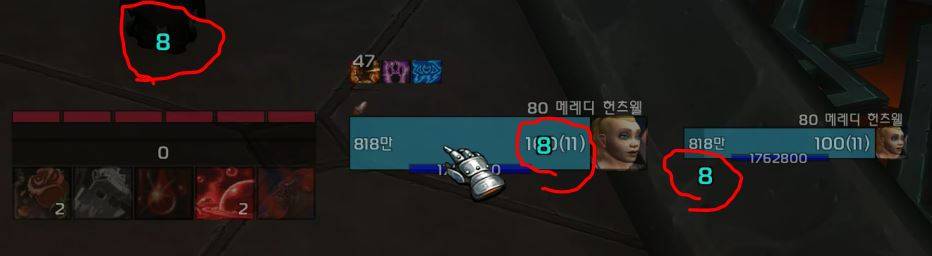
Key Features
- Unit Distance Tracking: Displays real-time distance for Target, Focus, and Mouseover units.
- Hostile Targets: Displays range from 5 to 100 yards, regardless of combat status.
- Friendly Targets (Out of Combat): Displays range from 5 to 80 yards.
- Friendly Targets (In Combat): Determined by character skill range (e.g., if a 25-yard skill is usable, it displays as 25m).
- Dynamic Color Coding: The distance text color changes based on the range:
- Red: > 40 yards
- Yellow/Orange: 30 – 40 yards
- Green: 20 – 30 yards
- Cyan/Blue: 5 – 20 yards
- Gray/White: ≤ 5 yards or 0
Configuration
You can modify the following settings via ESC > Options > Addons > asRangeDisplay:
ShowTarget: Toggle distance display for Target (Default: true)ShowFocus: Toggle distance display for Focus (Default: true)ShowMouseOver: Toggle distance display for Mouseover (Default: true)- Move Position: Enter the
/asConfigcommand in the chat. - Reset Position: Enter the
/asClearcommand in the chat to restore default settings.
Contact Information
- Korean Users: Visit the Inven asMOD Forum.
- English Users: Visit the asMOD YouTube Channel or GitHub.
asRangeDisplay (한밤)
대상/주시/마우스오버 거리를 표시
주요 기능
- 대상/주시/마우스 오버 유닛 의 거리를 표시
- 적대적 대상의 거리: 전투의 상관없이 5 ~ 100미터까지의 거리를 표시
- 아군 대상의 거리 (비전투): 5 ~ 80미터까지의 거리를 표시
- 아군 대상의 거리 (전투): 케릭의 스킬 사거리로 판단 (25미터 사거리 스킬이 있고 사거리 안에 있는 경우 25미터로 표기)
- 거리 색상: 거리 텍스트는 거리에 따라 색상이 변경:
- 빨간색: > 40미터
- 노란색/주황색: > 30-40미터
- 녹색: > 20-30미터
- 청록색/파란색 계열: > 5-20미터
- 회색/흰색: <= 5미터 또는 거리 0.
설정
ESC > 설정 > 애드온 > asRangeDisplay 에서 다음 설정 변경 가능
ShowTarget: 대상과의 거리 표시 여부 (기본값: true)ShowFocus: 주시 대상과의 거리 표시 여부 (기본값: true)ShowMouseOver: 마우스 오버 대상과의 거리 표시 여부 (기본값: true)- 위치 이동 :
/asConfig명령어 채팅창에 입력 - 위치 초기화 :
/asClear명령어 채팅창에 입력, 기본 설정으로 초기화
문의처
한글 유저:인벤 asMOD 포럼방문 (https://www.inven.co.kr/board/wow/5288)영문 유저:Youtube asMOD 채널방문 (https://www.youtube.com/@asmod-wow),Github방문 (https://github.com/aspilla/asMOD/)
At-a-glance numbers
Performance highlights
- Peaked at Hot #2168 on Jun 27, 2026.
- Peaked at Rising #1253 on Jun 27, 2026.
- Featured on the Hot list across 6 distinct weeks.
- Shipped 1 release in the last 30 days.
- Averaging 7 new downloads per day over the past week.
Visuals
Screenshots 1
Use real gameplay shots to assess the addon before installing.